
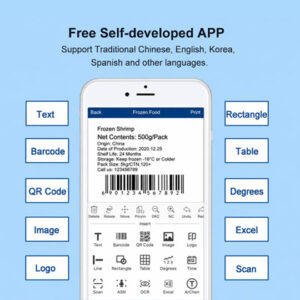
In modern retail aisles, mobile fulfillment hubs, and field operations, smartphone and tablet integration has transformed commercial labeling. A hardware device is only as agile as the label printer app that controls it. Whether your staff is updating retail shelf tags on the go, printing asset codes in a warehouse, or generating shipping labels from a mobile device, an intuitive mobile software interface dictates your operational speed and error rates.
To help IT managers, retail directors, and procurement heads evaluate mobile software capabilities, this FAQ guide addresses essential technical questions regarding mobile OS compatibility, template customization, cloud database integration, and SDK development kits.
What mobile operating systems and connectivity protocols should my label printer app support?
Enterprise workflows require seamless, zero-friction wireless communication between mobile smart devices and thermal hardware:
- Cross-Platform OS Compatibility:The companion app must offer feature-parity across both iOS (iPhone/iPad) and Android (phones/tablets/PDAs)
- Multi-Protocol Wireless Pairing:Look for apps that support instant Bluetooth 5.0+ auto-pairing and Wi-Fi / LAN network connections, enabling multi-user mobile printing without dropping signals mid-shift.
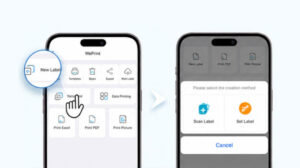
What design features and media templates should a commercial label printer app offer?
A professional mobile app eliminates the need to design labels from scratch on a desktop computer. Essential features include:
- Rich Pre-Designed Template Libraries:Built-in industry templates for e-commerce shipping (4×6 waybills), retail price tags, cable markers, and GHS hazard icons.
- Advanced Graphic & Barcode Engines:Full support for generating dynamic 1D barcodes (Code 128, EAN-13) and 2D DataMatrix/QR codes, alongside custom fonts, shapes, lines, and imported company logos.
- Smart Media Recognition:Auto-detecting gap, black-mark, and continuous label media types to adjust print margins automatically and prevent skewing.
Can a label printer app import variable data from Excel or cloud databases?
Yes. Modern enterprise label maker apps eliminate manual typing errors by supporting dynamic batch data imports:
- Local File Imports:Import standard Excel (.xlsx), CSV, or TXT files directly from mobile storage to execute batch variable printing in seconds.
- Cloud Account Syncing:Save customized templates to secure cloud accounts, allowing administrators to push standardized label layouts instantly across nationwide store locations or multi-warehouse teams.
How can developers integrate the label printer app functionality into proprietary software using SDKs?
If your enterprise operates a proprietary WMS, POS, or ERP mobile application, standalone third-party apps may not fit your technical architecture. Hardware manufacturers provide native Mobile SDKs (Software Development Kits) for iOS and Android. These SDKs allow internal app developers to embed background printing, automatic Bluetooth pairing, and direct hardware status monitoring (e.g., paper-out or low battery alerts) directly into your company’s native mobile software.
Optimize Your Mobile Workflows with Detonger
Software versatility and hardware reliability must work together to deliver maximum operational uptime. Upgrading your mobile workforce with open-ecosystem thermal label printers paired with robust mobile apps ensures smooth integration into your existing technical architecture, eliminating formatting errors and accelerating outbound processing.
With over 16 years of unified R&D manufacturing precision, and global supply chain excellence, Detonger provides premium thermal label hardware paired with feature-rich mobile apps and robust developer SDKs. Explore our [FAQ Hub] for technical documentation or browse our [Related Product Category] to find mobile app-compatible label printers.
Need expert assistance selecting the right label printer app and hardware configuration for your team?