
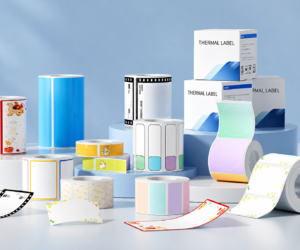
When the holiday season approaches, packaging presentation and file organization become the frontline of productivity and personal touch. Whether you are coordinating corporate gift distributions, sorting seasonal office archives, or running an online store preparing festive orders, setting up an efficient workflow for your christmas labels print tasks turns seasonal chaos into a streamlined, high-impact experience.
Moving past slow third-party print shops and messy, hand-drawn tags, modern thermal labeling hardware offers an agile, inkless solution. As mapped in our content pipeline , this comprehensive FAQ guide breaks down how a smart labeling system handles holiday gift wrapping, administrative organizing, and small-batch packaging workflows effortlessly.
How can I manage a high-volume christmas labels print workflow without wasting materials?
The most efficient approach is adopting a smart direct thermal label maker that connects wirelessly to your mobile devices or PC.
Standard desktop inkjet printers force you to run full multi-label adhesive sheets even if you only need a few custom gift tags, resulting in significant paper waste. A compact thermal printer uses precise electrical heat activation to output exact label quantities on demand—from a single custom “To/From” holiday sticker to hundreds of branded customer tags—with zero ink, zero toner, and zero carbon ribbon costs.
What are the top organizational use cases for a portable printer beyond the holidays?
Versatility is the greatest strength of modern compact thermal hardware. Once the holiday rush concludes, your device transitions seamlessly into year-round organizational tasks:
- Office Administration & Archiving:Creating durable folder spines, binder dividers, file cabinet markers, and applying asset tags to identify chaotic office cable setups.
- Home & Pantry Storage:Labeling kitchen spice jars, meal prep containers, seasonal storage totes, and kids’ school supplies.
- Boutique & Small-Batch Fulfillment:Printing custom price tags, ingredient lists, batch numbers, and return address stickers for home-based e-commerce shops.
How do I print custom holiday icons, dynamic QR codes, and custom fonts wirelessly?
Modern commercial-grade tag printers pair seamlessly via Bluetooth or Wi-Fi with iOS, Android, and PC software. Dedicated companion applications feature extensive design libraries containing seasonal borders, holiday icons, dynamic QR codes, and custom typography. You can easily import your corporate logo or upload custom artwork to produce professional, high-contrast labels in seconds.
What media traps should I avoid when choosing a printer for seasonal and office labeling?
Many consumer electronics brands sell hardware at discount prices but engineer the machines with locked, micro-chipped cartridge slots. This forces you to buy expensive proprietary paper rolls.
To secure long-term Return on Investment (ROI), mandate an open consumable ecosystem. Verify that the printer accommodates standard, non-proprietary third-party thermal paper rolls, die-cut shapes, and transparent stickers. This allows your family or purchasing office to source diverse colors, shapes, and sizes from wholesale suppliers at fair market rates.
Streamline Your Seasonal and Office Workflows with Detonger
Elevating your holiday presentation and office organization doesn’t require complex machinery or high material costs. Replacing handwritten tags or wasteful print sheets with a versatile [Portable Label Printer] empowers you to streamline seasonal shipping, safeguard archives, and scale small-batch production with total agility.
With over 16 years of unified R&D and manufacturing excellence, Detonger builds versatile, compact thermal label printers engineered for modern domestic and commercial applications. Our devices integrate intuitive mobile software packed with pre-designed templates, delivering a robust [Office Labeling Solution] built to maximize your operational efficiency.
Need expert guidance to select the ideal printer model for your home or business?