

A handheld label maker is a portable, commercial-grade thermal printing device designed to empower floor staff, warehouse workers, and field technicians to generate professional identification tags and barcodes on demand. The most critical selection factors include the core printing technology (direct thermal for short-term retail versus thermal transfer for long-term asset durability), print width adaptability, printhead resolution (203 DPI vs. 300 DPI), and intelligent software integration for batch processing. Users should initially judge their requirements by identifying the physical location and durability needs of their inventory. If you are managing a fast-paced retail floor or shipping department, an inkless portable direct thermal unit provides maximum agility. However, if your assets are exposed to the elements, harsh chemicals, or long-term warehousing, a thermal transfer device is strictly required to ensure lasting legibility.
The Strategic Value of Mobile Printing
In traditional operational workflows, staff must manually write tags or walk back and forth to a centralized office desktop printer to generate barcodes. This centralized approach creates massive bottlenecks, increases the likelihood of applying the wrong tag to an item, and wastes valuable labor hours.
Deploying a professional handheld label maker decentralizes your identification process. By putting a complete digital printing station into the palm of a worker’s hand, businesses can react instantly to inventory changes. Whether a retail manager is updating flash sale pricing in aisle three, or an IT technician is tagging a newly installed server in the data center, on-the-spot mobile printing eliminates data disconnects, speeds up audits, and enforces standardized, scannable branding across the entire enterprise.
Key Selection Criteria for Business Owners
Procuring a mobile printer for commercial use requires evaluating hardware based on environmental endurance, media flexibility, and connectivity. B2B buyers should focus on these critical specifications:
- Print Technology:Your choice dictates ongoing consumable costs and label lifespan. Direct thermal printers use heat-sensitive paper, requiring zero ink or ribbons, making them highly cost-effective for retail and logistics. Thermal transfer printers use a heated printhead to melt a solid resin ribbon onto synthetic labels, producing archival-quality, waterproof tags for heavy industry and asset tracking.
- Media Width Flexibility:A versatile business requires versatile tags. Your device must feature adjustable internal media baffles. A warehouse might need a 4-inch (104mm) width for shipping labels, while a boutique might need a 2-inch (50mm) width for clothing tags, and an IT department might need a narrow 1.5-inch (36mm) width for cable wraps.
- Print Resolution (DPI):203 DPI is the industry standard and perfectly sufficient for standard text and 1D shipping barcodes. However, if you need to print dense 2D QR codes, complex brand logos, or micro-text on small cosmetic jars or electronic components, upgrading to a 300 DPI printhead is mandatory to prevent scanning failures.
- Battery Endurance & Ergonomics:Field mobility requires an ergonomic design and a reliable power source. Look for devices equipped with high-capacity lithium-ion batteries (1500 mAh to 2600 mAh) that can sustain continuous batch printing across an entire 8-hour shift on a single charge.
Print Technology Comparison: Which Fits Your Business?
Understanding how thermal technologies perform in the real world is crucial for optimizing your hardware investment:
| Feature / Metric | Direct Thermal Handheld Label Maker | Thermal Transfer Handheld Label Maker |
| Print Mechanism | Heat-sensitive paper darkens when heated | Heated printhead melts a ribbon onto the label |
| Consumables Needed | Direct thermal label rolls only (no ink) | Synthetic labels AND a resin/wax ribbon |
| Environmental Durability | Moderate (Fades under UV light or high heat) | Extreme (Waterproof, oil-proof, scratch-proof) |
| Average Print Lifespan | 6 to 12 months (in controlled indoor settings) | 5 to 15+ years (in harsh conditions) |
| Operational Cost | Lower (Zero ribbon replacement costs) | Moderate (Requires two separate consumables) |
| Ideal Business Use Case | Retail price tags, shipping labels, bakeries | IT asset tracking, outdoor nursery tags, jewelry |
Expert Hardware Recommendations from Detonger
Selecting the right device requires matching the machine’s width capacity and printing technology to your specific operational scale. Detonger brings 16 years of independent research, global ISO/CE/FCC certifications, and 11 invention patents to the commercial marking sector.
Detonger DP27 Series: The Agile 2-Inch Retail Solution
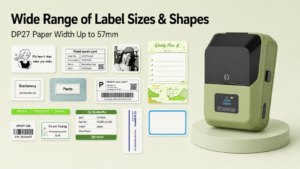
For boutiques, cafes, pharmacies, and small businesses, the Detonger DP27 Series is the ultimate portable direct thermal tool.
- Why it fits your business:Weighing just 292g, this 2-inch printer is effortless for staff to carry all day. It supports label widths up to 57mm and is available in both standard 203 DPI (DP27L/DP27S) and a high-definition 300 DPI version (DP27P). It is perfect for printing sharp barcodes, promotional stickers, and pricing tags directly on the sales floor with zero ink costs.
Detonger DT5150: The Compact Thermal Transfer Specialist
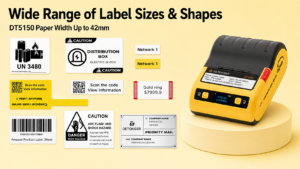
If your business requires durable tracking for IT assets, handmade jewelry, or laboratory vials, the Detonger DT5150 1.5-inch All-in-One Thermal Transfer Printer is the optimal choice.
- Why it fits your business:Outputting at 300 DPI, it ensures that micro-QR codes are flawlessly scannable. It utilizes an innovative one-piece consumable cassette that pre-loads the resin ribbon and synthetic Silver PET label together, allowing your staff to reload the printer in seconds without threading loose ribbons. The resulting tags are completely waterproof and chemical-resistant.
Detonger DP40 Series: The 4-Inch Logistics Heavyweight
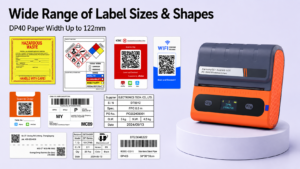
For e-commerce sellers, 3PL warehouses, and shipping dispatchers, the Detonger DP40 Series handles high-volume logistics.
- Why it fits your business:Supporting media widths up to 114mm (with a 104mm effective print width), it easily outputs standard 4×6 inch courier waybills. Powered by dual 2600 mAh batteries, warehouse staff can execute massive batch-printing jobs directly at the loading dock, ensuring packages are labeled and shipped without delay.
Streamlining Operations with Intelligent Software
Durable hardware must be paired with intuitive software to eliminate manual data entry bottlenecks. Detonger printers connect seamlessly via Bluetooth to our proprietary software ecosystems, available on iOS, Android, and PC.
Our Weprint App allows operations managers to design custom templates featuring dynamic barcodes, logos, and tables. Crucially, the software supports direct Excel data imports, enabling users to automatically batch-print hundreds of serialized asset tags or shipping labels in minutes. For retail storefronts, the Mercury Shop App offers dedicated price tag management, allowing floor staff to scan product barcodes and instantly print updated pricing pulled directly from your cloud database.
Investing in a dedicated handheld label maker is a strategic operational upgrade that eliminates pricing errors, prevents lost assets, and accelerates your daily workflows. Explore our versatile Portable Label Printer and Handheld Label Maker for Small Business collection, or discover our high-efficiency Thermal Label Printer and Barcode Label Printer for Warehouse, Inventory and Asset Tracking lineups to find the perfect fit for your enterprise today.
Frequently Asked Questions (FAQs)
Q: Can I print labels directly from my iPhone or Android device?
A: Yes. Modern handheld label makers connect directly to smartphones and tablets via Bluetooth. By downloading a companion application (like Detonger’s Weprint or Mercury Shop), you can design labels, access cloud templates, and execute print jobs entirely from your mobile device without ever needing a desktop computer.
Q: Do portable label makers require Wi-Fi to function?
A: No, Wi-Fi is not strictly required. The printer connects locally to your smartphone or tablet via a direct Bluetooth connection. While an internet connection (cellular or Wi-Fi) is helpful for downloading cloud templates or syncing your product database via the app, the actual transmission of the print job from your phone to the printer relies purely on Bluetooth.
Q: Why are my printed barcodes scanning inconsistently?
A: Scanning failures usually stem from low print resolution or poor formatting. If you are printing tiny, dense 2D QR codes on a standard 203 DPI printer, the pixels can blur together; upgrading to a 300 DPI device resolves this. Additionally, ensure your label design has sufficient “quiet zones” (blank white margins around the barcode) and that the printhead is clean and free of dust.