
A waterproof label printer is an essential piece of commercial thermal hardware designed to help e-commerce dispatchers, 3PL warehouses, and freight operators generate moisture-resistant, highly scannable shipping labels. When a package leaves your loading dock, it faces unpredictable environmental hazards—from rain and snow during last-mile delivery to condensation inside refrigerated transport trucks. If you rely on standard desktop inkjet printers or cheap direct thermal paper, moisture will instantly smudge the ink or dissolve the barcode, resulting in missed delivery guarantees, manual sorting delays, and expensive carrier relabeling fees. By following a structured approach to hardware selection, media pairing, and software integration, businesses can completely eliminate weather-induced scanning failures.
Step 1: Select the Appropriate Printing Technology
To print truly durable shipping labels, you must abandon standard office printers and utilize industrial thermal technology. However, you must choose the correct thermal mechanism based on the severity of your logistics environment:
- Direct Thermal Printing (For Standard E-commerce):This is the industry standard for courier waybills (UPS, FedEx, USPS). The printhead applies heat directly to chemically treated paper. To make this process waterproof, you must pair the printer with specialized “three-proof” coated media (see Step 2). This provides an incredibly fast, inkless, and cost-effective workflow for packages that need to survive standard rain and handling for 1 to 4 weeks.
- Thermal Transfer Printing (For Extreme Freight):If you are dispatching heavy machinery, chemical drums, or ocean freight that will sit in outdoor shipping yards for months, direct thermal paper is insufficient. You must use a thermal transfer label printer. This device melts a solid resin ribbon onto synthetic plastic labels (like PET), creating an impenetrable bond that survives prolonged saltwater submersion, extreme UV rays, and harsh chemical exposure.
Step 2: Equip the Correct Waterproof Media
The printer hardware applies the heat, but the media dictates the survival of the barcode.
- For Direct Thermal Printers:You must explicitly purchase “Three-Proof” (3-Proof) Direct Thermal Paper. This premium paper features a specialized chemical top-coat that is actively waterproof, oil-proof, and scratch-resistant. When water hits this label, it beads up and rolls off rather than soaking into the paper pulp, ensuring the 203 DPI tracking barcode remains perfectly scannable.
- For Thermal Transfer Printers:You must load a Pure Resin Ribbon and a Synthetic Label Roll (such as Matte Silver PET or flexible PVC). Do not use wax ribbons for shipping, as wax can easily smudge under heavy transit friction.
Step 3: Automate Dispatch with Batch-Printing Software
Printing durable labels one by one using a manual keyboard is a massive bottleneck. A professional waterproof label printer must be integrated with intelligent dispatch software to handle high daily order volumes.
Detonger printers integrate natively with our proprietary Weprint ecosystem, accessible on iOS, Android, and Windows PC. To execute a flawless dispatch operation:
- Export your daily orders from your e-commerce platform (Shopify, Amazon, ERP) into an Excel spreadsheet.
- Import the spreadsheet directly into the Weprint app on your smartphone or PC.
- Map the data columns (Recipient Name, Address, Tracking ID) to your 4×6 shipping template.
- Execute the print job via Bluetooth or Wi-Fi. The printer will instantly batch-print hundreds of serialized, waterproof courier waybills at high speeds, completely eliminating manual address entry errors.
Expert Hardware Recommendations from Detonger
Selecting the right hardware requires matching the machine’s print width and battery capacity to your warehouse operations. Detonger provides purpose-built, ISO/CE-certified hardware tailored for the logistics sector.
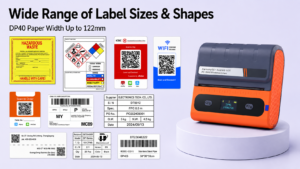
Detonger DP40 Series: The 4-Inch E-commerce Champion
For fast-growing fulfillment centers and mobile warehouse staff, the Detonger DP40 Series is the ultimate direct thermal solution.
- Why it excels in shipping:This 4-inch portable printer easily accommodates the industry-standard 4×6 inch (100x150mm) courier waybill format. When loaded with Detonger’s 3-proof direct thermal rolls, it produces razor-sharp, waterproof shipping labels at high speeds. Powered by dual 2600 mAh batteries, forklift operators and dispatchers can batch-print massive order queues directly at the pallet, eliminating the need to walk back to a stationary packing desk.
Detonger DT7330 & DT6250: For Heavy Ocean Freight
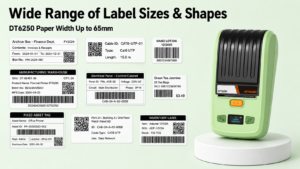
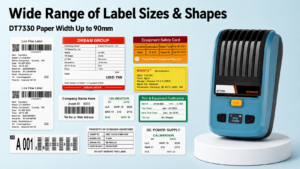
If your logistics network involves cross-border maritime transport or heavy industrial equipment that will face severe outdoor weathering, the thermal transfer Detonger DT7330 (3-inch) and Detonger DT6250 (2.5-inch) offer unmatched durability.
- Why they excel in shipping:These split-type printers separate the ribbon from the label roll, allowing you to cost-effectively load high-capacity synthetic PET tags and premium resin ribbons. The resulting shipping markers are virtually indestructible, surviving heavy abrasion and saltwater exposure during complex global transit routes.
Upgrading your fulfillment line with a dedicated waterproof label printer prevents costly routing delays and protects your brand’s reputation from the moment a package leaves the warehouse. Explore our high-efficiency Shipping Label Printer for E-commerce, Warehouse and Logistics line, equip your mobile staff with our Thermal Label Printer collection, or optimize your entire facility with our Efficient Warehouse Label Printing solutions today.
Frequently Asked Questions (FAQs)
Q: Do I need to buy expensive ink cartridges to print waterproof shipping labels?
A: No. Commercial shipping printers utilize thermal technology, which requires zero liquid ink. If you use a direct thermal printer, the heat activates a chemical within the 3-proof waterproof paper itself. If you use a thermal transfer printer, the heat melts a solid resin ribbon onto the label. Because there is no wet ink, the printed barcodes will never smear when exposed to rain.
Q: Why do my current shipping labels turn black when left in a hot delivery truck?
A: You are likely using economy-grade direct thermal paper without a protective top-coat. Cheap thermal paper is highly reactive to ambient heat and UV light. If a package sits in a sweltering delivery vehicle or in direct sunlight, the heat will activate the entire label, causing it to turn black and destroying the barcode. Upgrading to premium 3-proof top-coated paper prevents this thermal degradation.
Q: Can I print 4×6 waterproof shipping labels directly from my iPhone?
A: Yes. Modern portable logistics printers, such as the Detonger DP40, connect directly to iOS and Android devices via Bluetooth. By using a companion application like Weprint, you can import your shipping data, generate the 4×6 courier barcodes, and print them wirelessly directly from your smartphone while standing on the loading dock.