
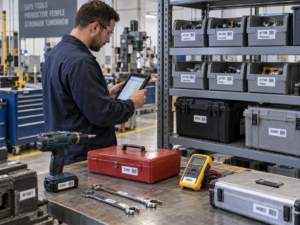
An asset tag label printer is an essential piece of industrial thermal hardware designed to help IT administrators, facility managers, and financial controllers create permanent, scannable identification markers for capital equipment. Effectively tagging fixed assets—ranging from office laptops and servers to heavy manufacturing machinery—is the foundation of modern inventory management and loss prevention. However, simply owning the printer is not enough; implementing a successful tracking system requires understanding how to pair the right synthetic materials, utilize high-resolution barcodes, and automate data input. This guide breaks down exactly how to use dedicated asset tracking hardware to secure your enterprise equipment.
Step 1: Select the Correct Thermal Media
The biggest mistake businesses make when tagging assets is using standard paper labels or direct thermal technology. Within months, standard adhesives dry out, and heat-sensitive paper turns black, destroying the barcode.
To create a permanent asset tag, you must use a thermal transfer label printer paired with industrial-grade consumables:
- The Substrate:Choose Matte Silver PET (Polyester) or flexible PVC. These synthetic materials are tear-proof, heat-resistant, and provide a professional metallic finish suitable for IT and electronics. For high-security environments, utilize tamper-evident VOID labels, which leave a permanent checkerboard pattern on the equipment if an unauthorized removal is attempted.
- The Ribbon:You must load a pure resin ribbon. The thermal transfer printer’s heated printhead melts this resin into the PET label, creating an archival-quality bond that is impervious to water, isopropyl alcohol, cleaning solvents, and UV fading.
Step 2: Design a Data-Rich Label Layout
An effective asset tag must provide both human-readable information and machine-readable data. Utilizing a printer with a 300 DPI (Dots Per Inch) printhead is strictly required to ensure micro-text and dense barcodes remain perfectly sharp.
A standard enterprise asset tag should include:
- Company Logo or Name:Clearly identifies ownership to deter theft.
- Asset ID Number:A unique alphanumeric serial number (e.g., AST-2026-001) for human visual verification.
- 2D Barcode (QR Code or DataMatrix):While 1D linear barcodes take up massive horizontal space, a 2D QR code can store thousands of characters in a tiny square. Scanning this code with a smartphone or PDA can instantly link a technician to the equipment’s digital maintenance record, warranty expiration, and department assignment.
Step 3: Automate Production with Batch-Printing Software
Manually typing hundreds of unique serial numbers on a small keyboard is inefficient and introduces severe data entry errors. Professional asset tagging relies on intelligent software integration.
Detonger hardware integrates natively with our proprietary WePrint application (available on iOS, Android, and PC). To execute a mass tagging operation:
- Export your company’s fixed asset register from your ERP or accounting software into a standard Excel (.xlsx) or CSV file.
- Open the WePrint app and import the spreadsheet.
- Map the data columns to your label template (e.g., map Column A to the human-readable text, and Column B to the QR code).
- Execute the print job via Bluetooth. The asset tag label printerwill automatically batch-print hundreds of unique, serialized tags in consecutive order in just minutes.
Step 4: Proper Surface Preparation and Application
Even the most durable industrial label will fail if applied incorrectly. To ensure the tag adheres for the full 5-to-10-year depreciation lifecycle of the equipment:
- Clean the Surface:Wipe the application area on the laptop, server rack, or power tool with an isopropyl alcohol wipe to remove dust, manufacturing grease, and fingerprint oils. Allow it to dry completely.
- Select a Low-Friction Location:Do not place the tag on the bottom of a laptop where it will constantly scrape against a desk, or over a ventilation fan where extreme heat is exhausted. Place it in a flat, recessed, or low-contact area.
- Apply Firm Pressure:Once applied, press firmly across the entire surface of the label to activate the high-tack acrylic adhesive and push out any microscopic air bubbles.
Expert Hardware Recommendations from Detonger
Selecting the appropriate unit involves matching the hardware’s print width to the size of your physical assets. Detonger brings 16 years of independent R&D and global certifications to the enterprise asset management sector.
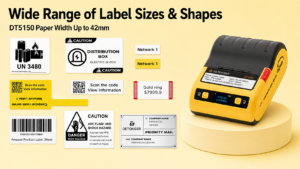
- Detonger DT5150 (The IT Asset Specialist):This ultra-compact 1.5-inch thermal transfer printer is the ultimate tool for IT departments. Outputting at 300 DPI, it is perfect for generating small, dense QR codes on 15mm or 25mm Silver PET tags for laptops, smartphones, and server blades. Its drop-in consumable cassette makes reloading instant and foolproof.
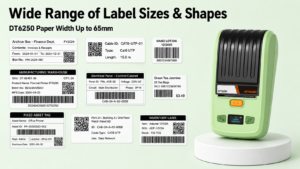
- Detonger DT6250 (The Facility & Inventory Workhorse):Supporting label widths up to 61mm, this 2.5-inch thermal transfer printer provides ample canvas space for prominent company logos and large barcodes. It is ideal for tagging AV equipment, medical devices, warehouse racking, and office furniture.
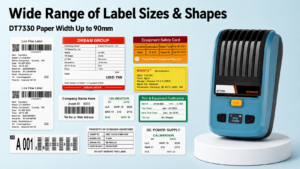
- Detonger DT7330 (For Heavy Machinery):If you are tagging large manufacturing equipment, HVAC units, or outdoor generators, this 3-inch wide-format printer accommodates the massive synthetic decals required for long-distance visual identification and outdoor weather resistance.
Mastering your equipment tracking workflow eliminates phantom assets, streamlines financial audits, and secures your physical infrastructure. Explore our robust Barcode Label Printer for Warehouse, Inventory and Asset Tracking collection to find the perfect dedicated hardware for your enterprise today.
Frequently Asked Questions (FAQs)
Q: Can I use an asset tag label printer to mark outdoor equipment, like construction machinery?
A: Yes, absolutely. However, you must ensure you are using a thermal transfer printer equipped with a pure resin ribbon and an outdoor-rated synthetic label (like heavy-duty PVC or specialized outdoor PET). This combination provides extreme UV resistance, preventing the tag from fading in direct sunlight, and is highly resistant to rain and temperature fluctuations.
Q: What happens if a thief tries to peel off the asset tag?
A: If you use standard labels, they can be peeled off easily. For capital equipment, you should load your printer with “Tamper-Evident VOID Labels.” These specialized tags utilize a dual-layer adhesive. If someone attempts to peel the label off, the top layer tears away, leaving a permanent, sticky checkerboard pattern or the word “VOID” firmly attached to the equipment, alerting you to tampering.
Q: Do I need a Wi-Fi connection in the warehouse to use the batch-printing app?
A: No, Wi-Fi is not strictly required during the printing process. Detonger portable printers connect directly to your smartphone or tablet via local Bluetooth. As long as you have the WePrint app installed and your Excel asset list saved directly on your mobile device, you can batch-print tags in dead zones or newly constructed buildings without an active internet connection.