

A qr barcode label printer is a high-performance thermal printing device engineered for warehouse managers, IT administrators, and retail operators to seamlessly generate both traditional 1D linear barcodes and high-density 2D QR codes within a single, unified workflow. The most critical selection factors for this dual-capability hardware are printhead resolution (300 DPI is strictly required to ensure micro-QR codes remain perfectly scannable), dual-technology support (the ability to switch between direct thermal and thermal transfer), and intelligent software that can process multiple data formats simultaneously. Users should initially judge their requirements by evaluating their data density needs and label size: if you must fit a legacy POS barcode, a modern product URL QR code, and a serialized batch number onto a single 2-inch tag, deploying a high-resolution, software-integrated portable printer is the only way to eliminate scanning errors and operational bottlenecks.
The Strategic Value of a Unified Barcode and QR Workflow
In modern supply chain and retail environments, relying solely on standard 1D barcodes (like UPC or Code 128) is no longer sufficient. While 1D barcodes are universally accepted by legacy Point of Sale (POS) scanners and courier systems, they hold a very limited amount of alphanumeric data. Conversely, 2D QR codes and DataMatrix codes can store thousands of characters, enabling businesses to embed digital user manuals, encrypted maintenance histories, and dynamic promotional URLs directly onto the product.
A dedicated qr barcode label printer bridges this technological gap by allowing enterprises to print both formats on a single label. This unified workflow prevents staff from having to print two separate tags using two different machines or software platforms. By utilizing a single high-resolution thermal printer driven by smart batch-processing software, businesses can satisfy legacy supply chain requirements (via the 1D barcode) while simultaneously delivering rich, interactive digital data to the end-consumer or field technician (via the QR code), drastically reducing consumable waste and labor time.
Key Hardware Specifications for Dual-Code Printing
Procuring hardware that can reliably output both linear lines and complex 2D matrices requires a strict focus on printhead precision and software processing power. B2B decision-makers must evaluate hardware based on the following specific criteria:
- 300 DPI Print Resolution (The Ultimate Requirement):A 1D barcode consists of vertical lines, which a standard 203 DPI printer handles easily. However, a QR code consists of a dense grid of microscopic square modules. If you attempt to print a small QR code at 203 DPI, the squares bleed together, rendering the code unreadable by smartphone cameras and optical scanners. A 300 DPI printhead guarantees crisp, razor-sharp edge definition for both barcode types on the same label.
- Media and Print Technology Adaptability:The printer must match your environmental durability needs. If your dual-code labels are for temporary retail pricing or standard e-commerce shipping, inkless direct thermal technology is the most cost-effective. If you are printing permanent asset tags for heavy machinery, you must utilize a thermal transfer label printer loaded with resin ribbons and synthetic PET labels to ensure the codes survive UV exposure and chemical wiping.
- Intelligent Software Architecture:The hardware is useless without software capable of multi-field encoding. The printer must connect to mobile or desktop applications that can simultaneously pull a SKU number (to generate the 1D barcode) and a web URL (to generate the 2D QR code) from a single Excel spreadsheet row.
Expert Hardware Recommendations from Detonger
Selecting the appropriate unit requires matching the machine’s print width and resolution to your specific label dimensions. Detonger provides purpose-built hardware for high-density, dual-format barcoding, backed by 16 years of commercial R&D.
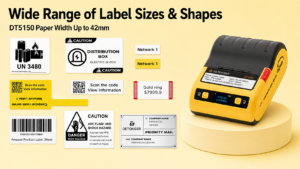
Detonger DT5150: The Compact 1.5-Inch IT & Asset Specialist
For IT departments, laboratories, and boutique retailers, the Detonger DT5150 is the optimal agile solution for dual-code generation.
- Why it fits a unified workflow:Engineered specifically for compact fixed-asset identification, this All-in-One Thermal Transfer Printer features a high-definition 300 DPI printhead. It allows technicians to easily fit a traditional 1D asset serial number alongside a 2D DataMatrix code (linking to maintenance records) on a label as narrow as 15mm or 36mm. Its drop-in cassette system makes media loading foolproof.
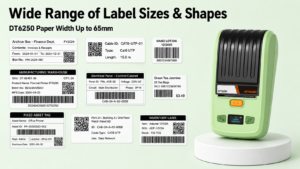
Detonger DT6250: The 2.5-Inch Professional Tracking Solution
For industrial inventory, electrical panels, and professional asset management, the Detonger DT6250 offers the perfect balance of width and precision.
- Why it fits a unified workflow:Supporting wider synthetic tags up to 61mm, this 300 DPI thermal transfer printer provides ample canvas space. Facilities can design labels that feature large, easy-to-scan 1D barcodes for warehouse forklift scanners, right next to detailed QR codes that field engineers can scan with their smartphones to access wiring diagrams.
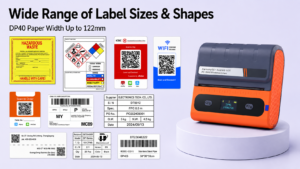
Detonger DP40 Series: The 4-Inch Logistics Workhorse
For e-commerce fulfillment and 3PL warehouses that need to add interactive elements to standard courier waybills, the Detonger DP40 Series is unmatched.
- Why it fits a unified workflow:This 4-inch direct thermal printer easily outputs standard 4×6 inch shipping labels. Shippers can use the DP40 to print the mandatory 1D carrier tracking barcode at the bottom of the label, while simultaneously generating a customized QR code at the top that links customers directly to a return portal or product setup video.
Streamlining Dual-Code Production with Weprint Software
Precision hardware must be driven by dynamic data processing. Detonger printers integrate natively with our proprietary Weprint software ecosystem, accessible on iOS, Android, and PC.
Weprint features an intuitive drag-and-drop canvas that allows managers to place both a 1D barcode element and a 2D QR code element onto the same label template. Through the software’s powerful Excel import capability, users can map column A to the 1D barcode (e.g., product SKU) and column B to the QR code (e.g., instruction manual URL). With a single tap, the software processes both data streams simultaneously, allowing you to batch-print hundreds of complex, dual-format labels in minutes without manual encoding.
Mastering both legacy and modern data tracking is essential for enterprise efficiency. By deploying a dedicated qr barcode label printer with 300 DPI resolution, thermal versatility, and smart batch software, your business can bridge the gap between warehouse logistics and digital customer engagement. Upgrade your tagging infrastructure today by exploring our comprehensive Barcode Label Printer for Warehouse, Inventory and Asset Tracking solutions.
Frequently Asked Questions (FAQs)
Q: Can one single thermal printer generate both standard linear barcodes and square QR codes?
A: Yes. The thermal printer itself simply outputs the graphic information it receives. The ability to generate both formats simultaneously comes from professional labeling software like Weprint. The software encodes your data into the respective 1D and 2D formats, places them on the same digital canvas, and sends the unified graphic to the printer for output.
Q: Why do I need 300 DPI if my current 203 DPI printer prints 1D barcodes just fine?
A: 1D linear barcodes consist of thick and thin vertical lines, which are relatively easy for a 203 DPI printhead to render accurately. QR codes and DataMatrix codes, however, consist of a highly dense grid of microscopic square modules. At 203 DPI, these tiny squares can bleed together on small labels, causing optical scanners and smartphone cameras to fail. 300 DPI guarantees the crisp edges required for flawless 2D code scanning.
Q: Do I need special paper to print both types of barcodes on one label?
A: You do not need special paper just because you are printing two types of codes; you need paper that matches your durability requirements. If the label is for a temporary retail item, standard direct thermal paper is fine. If it is an asset tag that must last for 5 years, you must use a thermal transfer printer with synthetic PET media and a resin ribbon to ensure both codes remain legible over time.