
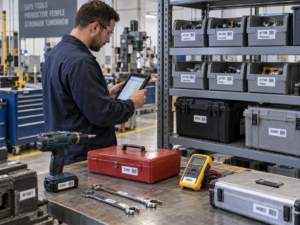
An asset tag label printer is a specialized, industrial-grade thermal device engineered specifically for IT managers, facility administrators, and warehouse operators to produce indestructible, permanent identification markers for capital equipment. The most critical distinction between this hardware and a standard office printer lies in the printing mechanism: a dedicated asset printer utilizes thermal transfer technology to melt solid resin into synthetic substrates, whereas standard office labelers rely on fading direct thermal paper or easily smudged inkjet ink. Decision-makers must evaluate their tracking environment: if you are attempting to tag laptops, servers, power tools, or outdoor machinery for a 5-to-10-year depreciation lifecycle, relying on a standard office printer is a costly operational mistake that leads to lost inventory and failed audits.
The Hidden Costs of Using Office Printers for Asset Tracking
Many businesses initially attempt to cut costs by using standard desktop laser printers, consumer-grade inkjet machines, or cheap direct thermal shipping labelers to print their fixed asset tags. However, these office environments are designed for temporary paperwork, not long-term physical asset tracking.
When a standard paper sticker is applied to an IT server, the heat generated by the machine dries out the commercial adhesive, causing the tag to peel off within months. If an office inkjet printer is used, the ink will smear the moment a technician wipes the equipment down with an alcohol sanitizing wipe. Furthermore, direct thermal labels—commonly used for shipping or file folders—are highly reactive to UV light and ambient heat; within six months, the barcode will turn completely black or fade to blank white, rendering it unscannable.
A dedicated asset tag label printer entirely eliminates these vulnerabilities. By fusing high-grade resin into flexible synthetic materials (such as Matte Silver PET or flexible PVC), these printers create a permanent, waterproof, and chemical-resistant bond. This guarantees that your serialized barcodes and DataMatrix codes remain 100% scannable through decades of handling, cleaning, and temperature fluctuations.
Key Technical Differences: Asset vs. Office Hardware
To understand why enterprise asset management requires dedicated hardware, compare the technical specifications of both printer categories:
| Feature / Metric | Dedicated Asset Tag Label Printer | Standard Office Label Printer |
| Core Print Technology | Thermal Transfer (Heated resin ribbon) | Direct Thermal, Inkjet, or Laser |
| Media Compatibility | Synthetic Matte Silver PET, PVC, VOID | Standard paper, coated paper |
| Chemical & Oil Resistance | Exceptional (Impervious to alcohol, solvents, grease) | Poor (Erased or degraded by liquids) |
| Printhead Resolution | Often 300 DPI (Essential for micro-QR codes) | 203 DPI or variable (Modules blur on small tags) |
| Hardware Portability | Portable, battery-powered for field audits | Stationary, tethered to a desktop |
| Expected Label Lifespan | 5 to 15+ years (Archival quality) | 3 to 12 months (Temporary use) |
If your goal is permanent capital equipment identification, loss prevention, or compliance with strict financial auditing standards, investing in a thermal transfer asset printer is the only financially sound choice.
Expert Hardware Recommendations from Detonger
Selecting the appropriate unit requires matching the hardware’s capabilities to your enterprise’s physical assets. Detonger provides purpose-built, ISO9001/CE-certified hardware engineered specifically for durable inventory and asset tracking.
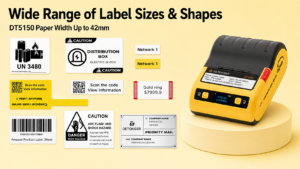
Detonger DT5150: The Compact IT Asset Specialist
For IT departments managing laptops, monitors, switches, and compact electronic gear, the Detonger DT5150 is the ultimate agile solution.
- Why it outperforms office printers:This 1.5-inch portable thermal transfer printer features a 300 DPI printhead, ensuring that dense micro-QR codes and serialized text are perfectly scannable on tags as narrow as 15mm. It utilizes an innovative one-piece consumable cassette, pre-loading the highly durable resin ribbon and Silver PET label together. This allows IT staff to drop in a cartridge and instantly print tamper-proof asset tags directly at the employee’s desk.
Detonger DT60 & DT6250: The Professional Inventory Workhorses
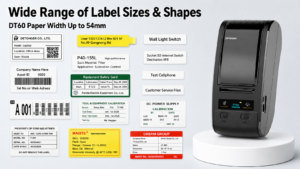
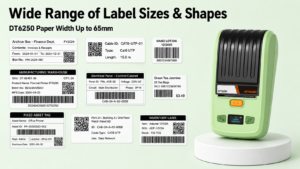
For growing warehouses, equipment rental businesses, and multi-room facility management, the 2-inch Detonger DT60 and the 2.5-inch Detonger DT6250 offer exceptional width and battery endurance.
- Why they outperform office printers:These split-type thermal transfer printers separate the ribbon from the label roll, drastically lowering the cost-per-print for high-volume asset audits. They support wide synthetic tags that accommodate prominent company branding, detailed asset specification text, inspection dates, and large 2D barcodes, making them perfect for server racks, electrical panels, and shelving units.
Detonger DT7330: For Heavy Machinery & Wide Format Tags
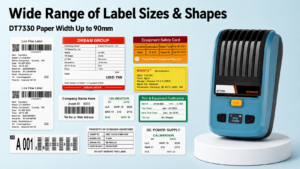
When tagging massive industrial equipment, HVAC units, or outdoor capital assets, the Detonger DT7330 offers robust 3-inch wide-format printing.
- Why it outperforms office printers:Standard office printers cannot produce weather-resistant wide-format decals. The DT7330 generates bold, highly readable tags that remain visible across large storage yards, surviving heavy grease, outdoor UV exposure, and pressure washing.
Scaling Asset Audits with WePrint Mobile Software
Professional hardware requires intelligent, error-free data processing. Detonger printers integrate natively with our proprietary WePrint software ecosystem, accessible on iOS, Android, and Windows PC.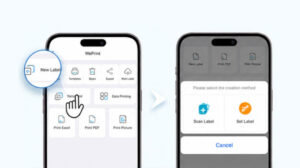
Unlike clunky office printer drivers, WePrint is designed for mobility. Facilities managers can import extensive equipment registers directly from Excel to their smartphone. Walking through the warehouse, they can connect to the printer via Bluetooth and automatically batch-print hundreds of sequential asset tags (e.g., AST-1001 to AST-1500) in minutes. For enhanced security, Detonger also supports printing on specialized tamper-evident “VOID” labels, which leave a permanent checkerboard pattern on the equipment if an unauthorized removal is attempted.
Choosing the right asset tag label printer over a consumer-grade office labeler guarantees that your capital equipment remains traceable, secure, and compliant. Upgrade your tagging operations today by exploring our comprehensive Barcode Label Printer for Warehouse, Inventory and Asset Tracking collection, or deploy full-scale Efficient Asset Management Solutions.
Frequently Asked Questions (FAQs)
Q: Can I use my current direct thermal office label printer to make permanent asset tags?
A: No. Direct thermal printers use heat to activate a chemical coating on paper. Over time, exposure to sunlight, ambient room heat, or fluorescent lighting will cause the entire label to turn black or fade completely. For permanent asset tags that last years, you must switch to a thermal transfer printer that uses a resin ribbon.
Q: What is the best label material to use with an asset tag label printer?
A: Matte Silver PET (polyester) is the industry standard for asset tagging. It provides a professional metallic finish, resists tearing, withstands the operating heat of IT devices, and does not peel or smudge when cleaned with standard isopropyl alcohol or disinfectant wipes.
Q: Why do I need a 300 DPI printer for asset tags?
A: Asset tags are often applied to small devices like smartphones, tablets, or hard drives. To fit a URL, an asset ID, and a scannable QR code onto a tiny 1-inch tag, the print elements must be microscopic. A 300 DPI printhead ensures that these tiny black-and-white modules have razor-sharp edges, eliminating scanning failures.