
A price labels printer is a commercial thermal device utilized by store managers, boutique owners, and supermarket staff to generate accurate, scannable barcode tags directly on the sales floor. The most critical steps to print retail price labels include selecting the correct thermal hardware (inkless direct thermal for short-term grocery tags versus thermal transfer for durable jewelry labels), determining the appropriate barcode format (1D UPC/EAN for standard POS systems or 2D QR codes for extended product data), and utilizing mobile batch-printing software. Users should initially judge their requirements by evaluating their daily pricing update volume. If your retail environment involves daily flash sales and thousands of SKUs, deploying a portable Bluetooth printer integrated with spreadsheet-import software is mandatory to eliminate manual data entry and checkout scanning errors.
Step 1: Select the Appropriate Thermal Hardware and Media
Retail environments demand different levels of label durability. Standard office laser printers are entirely unsuited for the physical demands of retail shelving, as standard ink smears and paper degrades under store lighting. To produce professional tags, you must select the correct thermal price labels printer:
- Direct Thermal Printers (For Fast-Moving Consumer Goods):Ideal for supermarkets, bakeries, and clothing boutiques. Direct thermal technology applies heat to chemically treated paper, requiring no ink or ribbon. This provides the lowest cost-per-label for standard shelf-edge pricing and promotional stickers that only need to last 6 to 12 months indoors.
- Thermal Transfer Printers (For Premium and Durable Goods):Required for jewelry, cosmetics, optical glasses, and hardware. This technology melts a resin ribbon onto synthetic labels (like PET or PVC). The resulting tags are completely waterproof, oil-proof, and resistant to the friction of daily customer handling, ensuring the barcode remains scannable for years.
- Print Resolution (203 DPI vs. 300 DPI):If you are printing standard pricing on 50mm wide shelf labels, a 203 DPI printhead is highly efficient. However, if you are printing micro-barcodes on 15mm jewelry “dumbbell” tags, a 300 DPI printhead is strictly required to prevent the barcode lines from blurring together.
Step 2: Determine the Optimal Barcode Format
Before printing, you must configure your data to match your store’s Point of Sale (POS) and inventory scanners.
- 1D Linear Barcodes (UPC, EAN, Code 128):The global retail standard. These barcodes store numeric or alphanumeric data representing the product SKU. They require a wider label surface but are universally readable by any legacy laser scanner at the checkout counter.
- 2D Barcodes (QR Codes, DataMatrix):Ideal for modern retail operations and small packaging. A 2D barcode can store thousands of characters, allowing you to embed a product URL, promotional video, or detailed ingredient list within a tiny square. While highly efficient for space, ensure your store’s POS system utilizes modern 2D optical imagers to scan them.
Step 3: Automate the Workflow with Retail Software
Typing product names, prices, and 13-digit barcode numbers manually on a small label maker keyboard guarantees human error. Modern retail pricing requires intelligent software integration.
Detonger hardware pairs seamlessly with our proprietary Mercury Shop and WePrint mobile and desktop applications. These platforms allow store managers to bypass manual entry entirely:
- Cloud Database Synchronization:Floor staff can use their smartphone camera via the Mercury Shop app to scan a product’s existing barcode. The app instantly pulls the updated price and product name from your central inventory database.
- Excel Batch Import:For store-wide seasonal sales, managers can import an Excel or CSV spreadsheet containing hundreds of updated prices directly into the WePrint software.
- One-Touch Batch Printing:The software maps the spreadsheet columns to your customized label template, allowing you to batch-print hundreds of serialized barcode labels in minutes via Bluetooth, directly at the shelf edge.
Recommended Detonger Hardware for Retail Pricing
Detonger brings 16 years of independent hardware engineering, global ISO/CE/FCC certifications, and 11 invention patents to the retail sector.
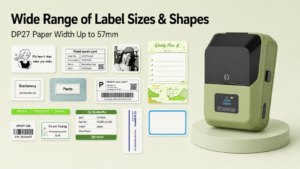
- Detonger DP27 Series (The 2-Inch Boutique Solution):Weighing just 292g, this direct thermal portable printer is the ultimate tool for clothing and small retail shops. Available in 203 DPI and 300 DPI configurations, it easily prints crisp 1D barcodes and promotional pricing on tags up to 57mm wide without requiring ink or ribbons.
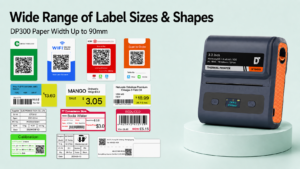
- Detonger DP300 Series (The 3.3-Inch Supermarket Workhorse):For grocery stores and pharmacies requiring wide shelf-edge labels, the DP300 accommodates media up to 90mm wide. Equipped with high-capacity 2600 mAh batteries, it supports massive batch-printing jobs during store-wide pricing overhauls.
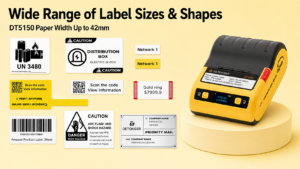
- Detonger DT5150 (The Premium Jewelry & Cosmetics Printer):This 1.5-inch thermal transfer printer outputs at a high-definition 300 DPI. Utilizing an innovative one-piece resin ribbon and synthetic label cassette, it produces indestructible, waterproof barcode tags for high-end retail items that face intense daily handling.
By aligning your specific retail environment with the correct thermal technology, 300 DPI resolution, and intelligent batch-printing software, your team can execute daily price changes flawlessly.
Frequently Asked Questions (FAQs)
Q: Do I need a special type of paper to print scannable barcodes?
A: Yes. If you are using a direct thermal printer, you must use high-quality, top-coated direct thermal paper. Cheap, uncoated paper lacks the stark black-and-white contrast required by optical scanners, leading to checkout failures. If you are using a thermal transfer printer, you must use synthetic label stock paired with the correct ribbon.
Q: Can I connect a portable price labels printer directly to my existing POS system?
A: Yes. Advanced commercial printers like the Detonger DP and DT series provide comprehensive SDKs (Software Development Kits) and API access. This allows your software developer to integrate the printing hardware natively into your existing POS or inventory management platform.
Q: How do I print price labels if my store does not have Wi-Fi?
A: Portable label printers do not require a continuous internet connection to print. The hardware connects directly to your smartphone, tablet, or industrial PDA via local Bluetooth. As long as the product data is cached in your mobile app (like WePrint), you can generate and print barcode tags offline anywhere in the store.