
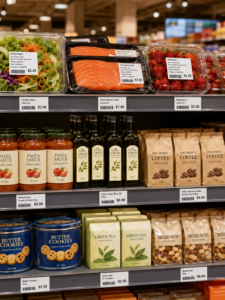
A price labels printer is a compact, high-efficiency thermal device designed for retail managers, boutique owners, and small business operators to generate clear, scannable price tags and barcode labels on demand. The most important selection factors include print technology (direct thermal is optimal for short-term retail environments), supported label width (typically 2 to 3.3 inches for shelf edge tags), battery mobility for on-the-floor tagging, and seamless smartphone integration for bulk pricing updates. Users should initially judge their needs by calculating their daily print volume and deciding whether they need to print directly at the store shelf or from a back office. For rapidly changing retail environments, a portable direct thermal printer integrated with inventory software is the most cost-effective and agile choice, allowing staff to update pricing instantly and accurately right where the product sits.
The Operational Value of Decentralized Retail Labeling
In a fast-paced retail environment, accurate pricing and clear barcodes are the lifeblood of your operations. Manually writing price tags or relying on centralized back-office laser printers is highly inefficient and prone to human error. A dedicated price labels printer empowers floor staff to react immediately to flash sales, inventory changes, and shelf restocks without abandoning the sales floor.
By utilizing a portable device, employees can walk down a supermarket aisle or boutique floor, scan a product’s barcode with a mobile app, and instantly print a new, highly legible price tag. This decentralized approach eliminates the disconnect between the back-office database and the physical store shelf. Ensuring that customers always see the correct, updated price reduces checkout disputes and vastly improves the overall shopping experience.
Essential Selection Criteria for Small Retailers
Consumer-grade label makers will not withstand daily commercial use. B2B decision-makers and store owners must focus on the following critical specifications when evaluating hardware:
- Hardware Mobility and Battery Life:Retail staff are constantly on the move. A lightweight, portable design is crucial. Look for devices equipped with high-capacity lithium-ion batteries (1500 mAh to 2600 mAh) that can comfortably last through a busy 8-hour shift without needing a mid-day recharge.
- Print Width Flexibility:Different products require distinct tag sizes. A jewelry display might need a tiny 15mm tag, while a supermarket shelf edge requires a wider 50mm to 80mm label to clearly display the product name, barcode, retail price, and promotional discounts. Ensure the printer features adjustable media baffles to handle various roll widths.
- Print Resolution (DPI):While 203 DPI is the standard and perfectly sufficient for bold prices and basic text, a 300 DPI printhead is highly recommended if your tags feature small QR codes, intricate brand logos, or dense product ingredients (such as on cosmetics or boutique food items).
- Software and Batch Processing:A retail printer is only as useful as its software ecosystem. Your device must connect via Bluetooth or Wi-Fi to a smartphone or tablet and support bulk data imports. The ability to pull an Excel sheet of today’s price changes and print them in batch is essential for saving labor hours.
Direct Thermal vs. Thermal Transfer for Retail Pricing
To make an informed purchasing decision, you must understand which printing technology aligns best with your specific retail sector.
| Feature / Metric | Direct Thermal Printing | Thermal Transfer Printing |
| Print Mechanism | Heat-sensitive paper darkens when heated | Heated printhead melts a ribbon onto the label |
| Consumables Needed | Direct thermal labels only | Synthetic labels AND a resin/wax ribbon |
| Label Durability | Moderate (Sufficient for indoor, climate-controlled retail) | Extremely High (Water, scratch, and chemical resistant) |
| Lifespan of Print | 6 to 12 months | 5 to 10+ years |
| Operational Cost | Lower (No ribbons to buy or replace) | Higher (Requires two separate consumables) |
| Ideal Retail Application | Grocery shelf tags, clothing swing tags, bakery labels | High-end jewelry tags, outdoor garden center labels |
For the vast majority of standard retail scenarios (supermarkets, convenience stores, apparel boutiques), direct thermal is the undisputed winner due to its lower cost and operational simplicity. Prices change frequently, meaning a tag only needs to last a few months. However, if you are selling jewelry or outdoor plants, thermal transfer is required.
Expert Hardware Recommendations from Detonger
Selecting the specific hardware model requires matching the machine’s capabilities to your store’s physical layout and inventory type. Detonger offers purpose-built hardware designed specifically for the rigorous demands of the retail sector.
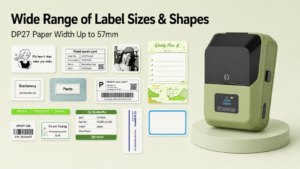
Detonger DP27 Series: The Agile 2-Inch Solution
For small businesses, boutiques, and pharmacies, the Detonger DP27 Series is an outstanding portable choice.
- Why it fits retail:Weighing only 292g, this 2-inch direct thermal printer is incredibly comfortable for staff to carry on their hip all day. It supports label widths up to 57mm. Available in both 203 DPI (DP27L/DP27S) and a high-definition 300 DPI version (DP27P), it is perfect for printing scannable barcodes on small cosmetics or clothing swing tags. Its built-in TFT screen allows users to easily monitor the printer’s status on the floor.
Detonger DP300 Series: The Supermarket Workhorse
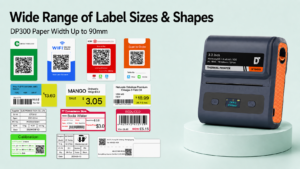
If you manage a supermarket, hardware store, or large retail chain with wide shelf-edge tracking profiles, the Detonger DP300 Series offers a wider 3.3-inch print capacity.
- Why it fits retail:It accommodates label widths from 25mm up to 90mm. This allows store managers to print large, highly visible “Clearance” or “Sale” tags that grab customer attention. The DP305P model, equipped with a 300 DPI printhead and dual 2600 mAh batteries, can handle massive batch printing jobs during store-wide pricing updates, making it a critical component of any thermal label printer
Optimizing Your Retail Workflow with Smart Software
The secret to maximizing the return on investment of a price labels printer lies in software integration. Detonger hardware pairs seamlessly with our proprietary Mercury Shop App, a software ecosystem developed specifically for retail price tag management.
Mercury Shop allows store managers to import commodities specifications and prices in bulk directly via Excel. Instead of typing out individual prices manually, floor staff can simply scan a product’s barcode with their phone, retrieve the updated price from the cloud database, and print the new label instantly. Furthermore, we offer a wide variety of customizable label rolls, including transparent labels, colored promotional tags, and standard white shelf paper, ensuring your store’s branding remains consistent.
Upgrading your retail labeling system is a strategic move that immediately reduces pricing errors, saves hundreds of labor hours, and enhances the visual professionalism of your store shelves. By prioritizing portable hardware, selecting the appropriate print width, and leveraging intelligent batch-printing software like Mercury Shop, your team can manage inventory effortlessly.
Ready to streamline your retail operations? Explore our highly-rated Portable Label Printer and Handheld Label Maker for Small Business collection, or discover our high-efficiency Barcode Label Printer for Warehouse, Inventory and Asset Tracking lineup to find the perfect fit for your dynamic pricing needs.
Frequently Asked Questions (FAQs)
Q: Do I need to buy ink or toner for a retail price tag printer?
A: No. A direct thermal price labels printer uses heat to activate specially treated chemical paper. This means you never have to buy, replace, or clean messy ink cartridges or toners. You only need to purchase the thermal label rolls, drastically lowering your ongoing operational costs.
Q: Can I connect a portable label maker directly to my store’s POS (Point of Sale) system?
A: Yes. Advanced printers like the Detonger DP series provide comprehensive SDKs (Software Development Kits) and APIs for Windows, iOS, and Android. This allows your IT team or software provider to integrate the printer directly into your existing POS or inventory management system for automated, real-time price printing.
Q: What kind of label material is best for grocery or refrigerated items?
A: For items stored in refrigerators or freezers (like dairy, meat, or cold beverages), standard economy thermal paper will absorb moisture and degrade quickly. You must utilize synthetic thermal labels (such as waterproof PP or “three-proof” top-coated thermal paper) paired with a freezer-grade adhesive to ensure the tag remains attached and readable in cold, high-condensation conditions.