
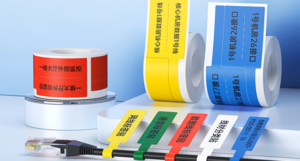
A cable label printer is a specialized industrial device designed to produce durable, legible markers for wires, cables, and network panels on the go. It is intended for telecom engineers, IT technicians, and electrical contractors who operate in demanding outdoor or off-site environments. The most important selection factors include print technology (thermal transfer is essential for longevity), hardware portability, battery capacity, label material compatibility (such as heat shrink tubes and self-laminating PVC), and software connectivity for mobile devices. Users should initially judge a printer by assessing their field environment: if you are labeling server racks indoors for short-term projects, a compact direct thermal unit might suffice temporarily; however, if you are tackling harsh outdoor telecommunications infrastructure, a rugged, high-resolution thermal transfer printer with mobile app support is absolutely mandatory to ensure compliance and prevent future maintenance failures.
The Unique Challenges of Field Work and Why a Specialized Cable Label Printer Matters
Field technicians face a very different set of challenges compared to office-bound workers. Whether scaling a telecommunications tower, crawling through tight conduit spaces, or managing a sprawling data center deployment, engineers rarely have the luxury of a stable desk, a Wi-Fi network, or a continuous power supply.
Standard office label makers or consumer-grade sticker printers are completely inadequate for these environments. They rely on fragile ink cartridges, lack battery endurance, and produce labels that fade, smear, or peel off when exposed to the elements. A professional cable label printer is engineered specifically to overcome these hurdles. It serves as a rugged, self-contained identification workstation that fits in a toolbelt, empowering technicians to generate highly durable, compliant wire markers—such as heat shrink tubes, wrap-around tags, and flag labels—precisely at the point of installation.
Crucial Specifications for a Field-Ready Cable Label Printer
To ensure you select the right hardware for your mobile workforce, you must evaluate several critical technical specifications. A printer is only as good as its ability to perform reliably under pressure.
1. Print Technology: The Foundation of Durability
For cable identification, the printing technology dictates the lifespan of the label. You generally have two choices in portable formats: Direct Thermal and Thermal Transfer. Because electrical wires are often subjected to friction, high temperatures, chemical solvents, and UV exposure, Thermal Transfer is the industry standard. It uses a heated printhead to melt a resin ribbon directly onto a synthetic label or polyolefin tube, creating a permanent bond that will not fade over time.
2. Print Resolution (DPI)
When dealing with fiber optic cables or thin 24 AWG wires, the printable surface area is incredibly small. A standard 203 DPI (Dots Per Inch) printer is sufficient for basic text and large numbers. However, if your field teams need to print scannable QR codes, intricate corporate logos, or dense technical specifications on narrow labels, a 300 DPI cable label printer is highly recommended to guarantee crisp, error-free scanning.
3. Battery Capacity and Power Management
A dead battery in the field means work stops. When evaluating portable printers, look closely at the lithium-ion battery capacity. A minimum of 1500 mAh is required for standard daily use, but heavy-duty deployments should target 2500 mAh to 2600 mAh batteries to ensure the device can power through an entire 8-to-10-hour shift without needing a recharge.
4. Consumable Loading Mechanism
In a dusty or windy outdoor environment, technicians do not have the time or clean space to manually thread delicate ribbons and calibrate separate label rolls. Modern industrial printers feature all-in-one consumable cassettes (combining the ribbon and the label roll) that can be dropped into the machine in a single step, drastically reducing downtime and the risk of contamination.
Direct Thermal vs. Thermal Transfer: Which Cable Label Printer Wins?
To make the best purchasing decision, it is vital to understand the difference between the two primary thermal printing methods available in mobile devices.
| Feature / Metric | Direct Thermal Cable Label Printer | Thermal Transfer Cable Label Printer |
| Print Mechanism | Heat-sensitive paper darkens when heated | Heated printhead melts a ribbon onto the label |
| Consumables Needed | Direct thermal labels only | Synthetic labels/tubes AND a ribbon |
| Label Durability | Low to Moderate (Fades in sunlight/heat) | Extremely High (Water, chemical, UV resistant) |
| Best Material Compatibility | Paper, some basic top-coated synthetics | PET, PVC, Silver PET, Heat Shrink Tubes |
| Lifespan of Print | 6 to 12 months (indoor) | 5 to 10+ years (indoor and outdoor) |
| Ideal Field Application | Temporary patching, indoor patch panels | Permanent outdoor grids, data centers, telecom |
For the vast majority of electrical and telecommunications field work, investing in a thermal transfer label printer is the only way to guarantee that your infrastructure remains identifiable for its entire lifecycle.
Expert Recommendations: Top Detonger Cable Label Printer Models
Selecting the specific hardware model requires matching the machine’s capabilities to your daily field applications. Detonger, a manufacturer with 16 years of independent R&D experience and multiple ISO certifications, offers advanced solutions engineered specifically for field engineers.
The DT5150: The Agile 1.5-Inch Solution
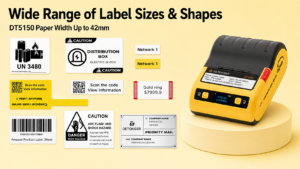
For technicians who need maximum mobility without sacrificing print quality, the Detonger DT5150 is an exceptional choice. This 1.5-inch portable thermal transfer printer is designed with an innovative one-piece consumable cassette, meaning field workers can swap out ribbon and label materials in seconds, even while wearing work gloves.
- Why it fits field work:It supports both 203 DPI and a high-definition 300 DPI option, making it perfect for printing dense barcodes on narrow wrap-around cable labels. Weighing just 390g, it easily clips to a utility belt, while its robust Bluetooth connectivity allows for seamless printing directly from a smartphone.
The DT5250: The Heavy-Duty 2.5-Inch Powerhouse
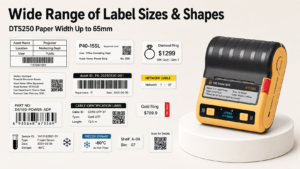
If your field projects involve thick power cables, large heat shrink tubes, or extensive asset tracking tags, the Detonger DT5250 offers a wider 2.5-inch print capacity.
- Why it fits field work:It accommodates print widths up to 61mm, allowing for highly detailed industrial labels. Crucially for field operations, the 300 DPI version is equipped with a massive 2600 mAh battery, ensuring uninterrupted performance during long deployments at remote cellular towers or newly constructed commercial buildings. The integrated anti-counterfeiting chip in the consumable cassette also ensures that only high-quality, optimal ribbons are used, protecting the printhead and guaranteeing label longevity.
Optimizing Field Workflow with Intelligent Software
The best cable label printer hardware is useless without equally robust software to drive it. In the field, technicians cannot rely on complex desktop software; they need intuitive mobile applications.
Detonger’s proprietary Weprint application bridges the gap between the office and the field. Supporting both iOS and Android, Weprint allows field technicians to connect to their printer instantly via Bluetooth. More importantly, it supports cloud-based template sharing. A project manager in the office can design a standardized label template—complete with required data fields, barcodes, and company logos—and push it to the cloud. The field technician simply opens the app, selects the template, and prints.
Furthermore, for massive data center labeling tasks involving hundreds of sequential ports, Weprint supports direct Excel data import. Instead of typing out “Port A1, Port A2, Port A3” manually on a small screen, the technician can import the entire spreadsheet and batch-print the run in seconds. This eliminates human error and drastically accelerates project completion times.
Conclusion: Securing Your Infrastructure
Choosing the right cable label printer for field work is a strategic decision that directly impacts the efficiency of your technicians and the long-term maintainability of your infrastructure. By prioritizing thermal transfer technology, high battery capacity, rugged design, and intelligent mobile software integration, you empower your team to do their best work in the toughest environments.
With hardware and software developed entirely in-house, backed by 11 invention patents and global certifications (CE, FCC, UKCA), Detonger provides the reliability that B2B enterprises demand. To equip your field teams with the ultimate in mobile identification technology, explore our complete range of durable wire & cable label printing solutions or discover the perfect specialized cable label printer for your upcoming infrastructure projects.
Frequently Asked Questions (FAQs)
Q: Can a portable cable label printer print on heat shrink tubing in the field?
A: Yes, provided the printer utilizes thermal transfer technology with a resin ribbon. Direct thermal printers cannot print on polyolefin heat shrink tubes. Printers like the Detonger DT5150 and DT5250 are specifically designed to accept flattened heat shrink tube cassettes, allowing technicians to print and shrink markers right at the installation site.
Q: How do field technicians handle large batch printing jobs without a laptop?
A: Modern industrial mobile printers bypass the need for a laptop by utilizing advanced smartphone applications. Using apps like Weprint, technicians can receive an Excel spreadsheet via email or a messaging app on their phone, import that data directly into the label template, and execute a batch print of hundreds of serialized labels completely wirelessly.
Q: What is the difference between a flag label and a wrap-around label, and do I need different printers for them?
A: A flag label is folded around the wire so the ends meet, creating a flat “flag” that hangs off the cable—ideal for fitting a lot of readable text or barcodes on very thin fiber optic strands. A wrap-around label features a printed area and a clear tail that wraps over the text to protect it (self-laminating). You do not need different printers; a versatile thermal transfer printer can print on both formats, provided you load the corresponding label cassette.