

An asset tag label printer is a dedicated thermal printing device used by IT managers, warehouse supervisors, and facility administrators to produce durable, long-lasting identification tags for fixed assets and inventory. The most important selection factors include the printing technology (thermal transfer is essential for longevity), print resolution (300 DPI for dense, scannable QR codes), label material compatibility (such as synthetic or silver matte PET), and software integration capabilities (like Excel batch printing). Users should initially judge their needs by determining the expected lifespan of the asset and its environmental conditions. If you are tracking IT hardware, manufacturing machinery, or warehouse racking that will remain in use for years, a high-resolution thermal transfer printer is the absolute minimum requirement to ensure tags do not fade or peel.
Key Factors in Choosing an Asset Tag Label Printer
When selecting hardware to manage your company’s fixed assets, standard office label makers fall short. Asset tags must survive friction, cleaning solvents, and years of ambient exposure. Here are the critical specifications to evaluate before making a purchasing decision:
- Print Technology for Maximum Durability:To prevent text and barcodes from fading over time, you must select a thermal transfer label printer. This technology melts a solid resin ribbon onto the label surface, creating a permanent, waterproof, and scratch-resistant bond.
- Print Resolution (DPI):Asset tags are often small to fit on laptops, servers, or tools, yet they must contain dense information like serial numbers and QR codes. A 300 DPI printhead is strongly recommended over standard 203 DPI to ensure flawless barcode scanning.
- Substrate and Material Compatibility:Your printer must be able to handle industrial-grade label rolls. Look for hardware that supports synthetic labels, PVC, and specifically Silver PET (matte silver), which provides a highly professional, tamper-evident finish for electronics and machinery.
- Software and Batch Processing:Managing hundreds of assets requires robust software. Ensure the printer pairs seamlessly with mobile and PC software that supports direct Excel data import, allowing your team to print sequential serial numbers in batch without manual data entry.
Thermal Transfer vs. Direct Thermal for Asset Tracking
To make an informed buying decision, you must understand the difference between the two primary thermal printing methods.
| Feature / Metric | Direct Thermal Printing | Thermal Transfer Printing |
| Print Mechanism | Heat-sensitive paper darkens when heated | Heated printhead melts a ribbon onto the label |
| Consumables Needed | Direct thermal labels only | Synthetic labels AND a ribbon |
| Label Durability | Low (Fades in light, heat, or over time) | Extremely High (Chemical, water, UV resistant) |
| Best Material Match | Standard Paper | PET, PVC, Silver PET |
| Average Lifespan | 6 to 12 months | 5 to 15+ years |
| Ideal Application | Temporary shipping labels, receipts | Fixed assets, IT inventory, heavy machinery |
As the table demonstrates, investing in a specialized asset tag label printer equipped with thermal transfer technology is non-negotiable for long-term inventory management.
Expert Recommendations: Detonger Asset Tag Label Printers
Selecting the specific hardware model requires matching the machine’s capabilities to your daily operational needs. Detonger, a manufacturer with 16 years of independent R&D experience, 11 invention patents, and ISO9001 certification, offers advanced solutions engineered specifically for enterprise asset management.
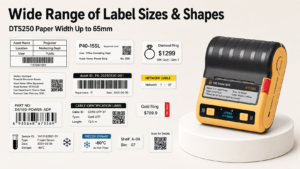
For standard IT and office asset tracking, we highly recommend the Detonger DT5250. This 2.5-inch portable thermal transfer printer supports a high-definition 300 DPI printhead and features an impressive 2600mAh battery for extended warehouse use. It is perfectly optimized for printing on matte silver PET labels, ensuring your computer and server tags look professional and last for years. Furthermore, it features an innovative one-piece consumable cassette, allowing staff to swap ribbons and labels in a single, error-free step.
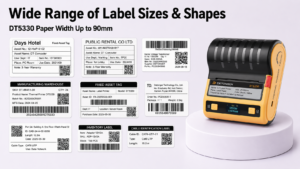
If your facility tracks larger manufacturing equipment or warehouse racks, the Detonger DT5330 offers a wider 3.3-inch print capacity. This allows for larger, more visible asset tags containing comprehensive maintenance logs and larger QR codes. Both models integrate seamlessly with our proprietary Weprint software. Weprint enables facility managers to share cloud-based templates across teams, import bulk data via Excel, and utilize comprehensive Efficient Asset Management Solutions. For large-scale industrial environments requiring stationary, high-volume output, exploring a dedicated Industrial Label Printer for Manufacturing, Warehouse and Durable Labels will complete your infrastructure.
Frequently Asked Questions (FAQs)
Can I use standard paper labels for tracking fixed assets?
Standard paper labels are highly susceptible to moisture, tearing, and fading. For fixed assets, you must use durable synthetic materials like PET or PVC combined with a resin ribbon to ensure the label survives the lifespan of the equipment.
How do I print asset tags remotely in a large warehouse?
Modern portable asset tag printers feature Bluetooth and Wi-Fi connectivity. Technicians can use a mobile app (like Weprint) on their smartphone to connect directly to the printer, scanning existing barcodes or importing cloud data to print tags right at the warehouse rack.
What is a one-piece consumable cassette?
Traditional thermal transfer printers require users to manually thread a delicate ribbon through the printhead and separately load a label roll. A one-piece cassette combines both the ribbon and the label roll into a single, pre-calibrated cartridge that drops into the printer in seconds, eliminating loading errors.