
A qr barcode label printer is a vital piece of industrial thermal hardware designed for automated manufacturing facilities, logistics hubs, IT departments, and medical laboratories to output machine-readable optical markers on demand. When configuring a 2D matrix printing setup, the fundamental engineering decision comes down to printhead resolution: 203 DPI (dots per inch) versus 300 DPI. While linear 1D barcodes (such as Code 128 or UPC-A) are relatively forgiving of lower resolutions due to their broad, single-axis bars, high-density 2D QR codes and DataMatrix symbols pack alphanumeric data into a tightly calibrated grid of microscopic square modules. Choosing the wrong resolution leads to module bridging, deformed timing patterns, and optical scanner rejection. Operations managers must evaluate their label dimensions and data payloads: if your team prints high-density 2D codes on compact asset tags, laboratory vials, or electronic sub-assemblies smaller than 30mm, investing in a 300 DPI thermal transfer printer is strictly mandatory to maintain 100% first-pass read rates and prevent severe supply chain bottlenecks.

The Microscopic Mechanics: How Resolution Governs QR Code Geometry
To understand why resolution dictates barcode performance, one must look at how thermal printheads generate digital imagery:
- 203 DPI (8 dots/mm):Each individual thermal print element measures approximately 125 mm (125 microns) in diameter. At 203 DPI, every module in a QR code matrix must be built using integer multiples of this 0.125 mm base dot. If a high-density QR code requires a module pitch smaller than 0.25 mm, a 203 DPI printhead will either round down (making cells too small to hold optical contrast) or round up (causing neighboring cells to merge and bleed together).
- 300 DPI (11.8 dots/mm):Each heating element measures approximately 084 mm (84 microns). This smaller dot pitch allows the printhead to render intricate, micro-scale square cells with razor-sharp geometric edges, straight vertical walls, and clearly defined quiet zones.
When data payloads expand—such as embedding 40-character encrypted URLs, JSON tracking strings, or ISO/IEC compliant serialization into a small 15mm or 20mm label—a 203 DPI printhead produces visible pixelation and “thermal bloom,” rounding off cell corners and causing scanner timeout errors. A 300 DPI qr barcode label printer preserves the strict dimensional ratios required by ISO/IEC 18004 standards, ensuring immediate reads under high-speed industrial imagers and smartphone cameras.
Detailed Comparison: 203 DPI vs. 300 DPI for QR Barcode Printing
| Engineering Parameter | 203 DPI Resolution | 300 DPI Resolution |
| Printhead Dot Pitch | ~0.125 mm (125 μm) | ~0.084 mm (84 μm) |
| Minimum Reliable QR Label Size | 30 mm x 30 mm and above | Down to 10 mm x 10 mm (micro-QR) |
| Micro-Module Edge Definition | Noticeable pixel stepping; rounded cell edges | Razor-sharp rectangular module geometry |
| Dense Data String Tolerance | Low (modules bleed when string exceeds ~25 chars) | High (handles 64+ character encrypted strings easily) |
| Accompanying Typography | Legible down to ~6pt to 8pt | Razor-sharp down to 3pt to 4pt |
| Print Speed Capability | Faster throughput (up to 150–200 mm/s) | Balanced throughput (100–127 mm/s) |
| Printhead Hardware Cost | Lower initial purchase and replacement cost | Slightly higher investment for micro-machined head |
| Primary Industrial Use Case | Large 4×6 courier waybills, pallet tracking | IT assets, PCB boards, lab vials, small parts |
When Can You Safely Deploy 203 DPI for QR Codes?
A 203 DPI qr barcode label printer remains the standard for broad logistics operations and large-format warehouse routing. You can safely deploy 203 DPI if your operational profile meets the following conditions:
- Large Physical Label Dimensions:You are printing on standard 4×6 inch (100x150mm) logistics waybills, 3×2 inch pallet routing slips, or large retail shipping cartons where the QR code can physically occupy a 35mm x 35mm footprint or larger.
- Low Data Density:Your QR codes encode short, static alphanumeric strings (such as a simple 6-digit to 10-digit tracking number) rather than lengthy URLs, cryptographic hashes, or complex variable payloads.
- Absence of Micro-Typography:The label does not contain dense multi-line compliance statements, 4pt chemical ingredient panels, or intricate engineering diagrams alongside the code.
When Is 300 DPI Strictly Mandatory for QR Barcode Printing?
For enterprise asset management, electronics manufacturing, medical diagnostics, and precision product packaging, 300 DPI is non-negotiable:
1. Compact Asset Tracking and Electronics (PCB Marking)
Data center server blades, telecom switches, circuit boards, and corporate laptops offer minimal flat surface space, often restricting labels to 15mm x 15mm or 20mm x 10mm. On tags this compact, 300 DPI is required to prevent microscopic black cells from bleeding into white spaces.
2. Clinical Laboratory Tubes and Cryovials
Microcentrifuge tubes (0.5ml, 1.5ml) and cryovials feature small, curved surfaces (often under 12mm wide). Printing serialized 2D DataMatrix or QR codes that scan instantly under automated plate readers requires a 300 DPI thermal transfer label printer running pure resin ribbon to ensure codes survive liquid nitrogen (-196°C) and solvent wipe-downs without distortion.
3. Dynamic URLs, Encrypted Data, and GS1 Digital Link
Modern traceability workflows increasingly deploy GS1 Digital Link QR codes containing complex web redirects, batch lot identifiers, and expiration dates. As character strings scale past 30 to 50 characters, the QR code algorithm increases its matrix version (adding more rows and columns). A 300 DPI printer renders these compressed modules with pristine clarity.
4. Luxury Packaging, Scented Candles, and Cosmetic Jars
Boutique makers and cosmetic packagers require crisp brand logos, 4pt ingredient declarations, and elegant micro-QR codes that do not look grainy or amateurish. A 300 DPI unit delivers a polished aesthetic that enhances premium shelf presence.
Recommended Detonger QR Barcode Printing Hardware
Detonger leverages 16 years of independent research, global ISO9001 quality certifications, and 11 invention patents to deliver robust thermal hardware tailored for precision 2D barcode generation.
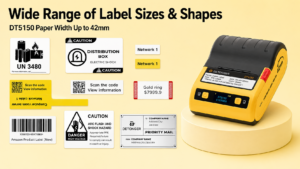
Detonger DT5150: The Compact 300 DPI Thermal Transfer Specialist
For IT departments, electronics manufacturers, and clinical laboratories requiring microscopic, impervious QR codes, the Detonger DT5150 1.5-inch All-in-One Thermal Transfer Printer delivers benchtop and mobile precision.
- Why it excels for QR codes:Outputting at a crisp 300 DPI, the DT5150 renders microscopic 2D DataMatrix and QR codes on narrow Matte Silver PET or cryogenic polypropylene labels down to 15mm wide. Its sealed, all-in-one consumable cassette integrates the pure resin ribbon and synthetic media into a single drop-in cartridge, eliminating manual ribbon threading and preventing dust contamination. Integrated Bluetooth connectivity allows technicians to generate durable 300 DPI QR markers directly at the server rack or biosafety cabinet.
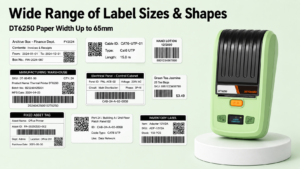
Detonger DT6250: Multi-Format 300 DPI Industrial Workhorse
For warehouse inventory racking, outdoor equipment identification, and manufacturing sub-assemblies requiring wider compliance formats, the Detonger DT6250 provides expanded media flexibility.
- Why it excels for QR codes:Supporting media widths up to 61mm (2.5 inches) at a sharp 300 DPI resolution, the DT6250 provides ample printable area for composite layouts—such as a dense tracking QR code paired with corporate branding, serial text, and linear barcodes. Its split-type consumable architecture separates the ribbon from the label roll, lowering the ongoing cost-per-label during high-volume enterprise tagging overhauls.
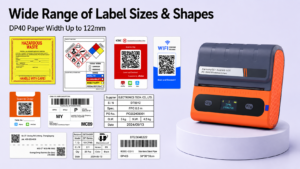
Detonger DP40 Series: The High-Volume 203 DPI Logistics Champion
For 3PL distribution centers, cross-dock logistics hubs, and shipping staging lanes where large 4×6 inch waybills are the primary deliverable, the Detonger DP40 Series provides high-speed efficiency.
- Why it excels for logistics:This 4-inch direct thermal printer accommodates media widths up to 114mm (104mm effective print width), outputting large, scan-ready shipping QR codes and courier waybills at high speeds. Powered by dual 2600 mAh battery packs, warehouse personnel can batch-print shipping tags directly at loading docks via Bluetooth.
Automating QR Code Production with WePrint Software
A dedicated qr barcode label printer requires intelligent design and database software to eliminate transcription errors. Detonger hardware integrates natively with the WePrint application across iOS, Android, and Windows PC.
WePrint simplifies 2D barcode generation through dedicated features:
- Dynamic QR Symbology Engine:Generates standard QR codes and Micro-QR formats with customizable Error Correction Levels (ECC Level L, M, Q, or H). Configuring Level H ensures codes remain scannable even if up to 30% of the label surface is scratched or obscured by dirt.
- Excel & CSV Database Binding:Operators can import external spreadsheets containing thousands of unique URLs, serial numbers, or inventory records. WePrint dynamically maps columns to the canvas, rendering unique, scannable QR codes for every record without manual data entry.
- Automated Serialization:For batch runs generated on the fly, WePrint features customizable incrementing rules (such as step values, prefix/suffix additions, and leading zero padding), ensuring synchronized advancing across barcodes and human-readable text.
Selecting the right printhead resolution protects your supply chain against scanning dropouts, prevents inventory data corruption, and ensures seamless optical verification across demanding environments. Explore Detonger’s specialized Barcode Label Printer for Warehouse, Inventory and Asset Tracking collection, or discover our high-durability Industrial Label Printer for Manufacturing, Warehouse and Durable Labels lineup to upgrade your 2D barcode printing workflow today.
Frequently Asked Questions (FAQs)
Q: Why do optical scanners fail to read small QR codes printed at 203 DPI?
A: Optical scanners and smartphone cameras decode QR codes by analyzing the exact spatial geometry and contrast between the dark and light square modules. At 203 DPI, individual print dots measure 0.125mm. On labels smaller than 25mm x 25mm, these larger dots cause neighboring micro-modules to bleed together, rounding off cell corners and obscuring timing patterns, which causes barcode imagers to reject the code.
Q: Does printing at 300 DPI slow down the label production speed?
A: Printing at 300 DPI involves a slightly slower feed speed (typically 100 mm/s to 127 mm/s) compared to 203 DPI (which can exceed 150 mm/s to 200 mm/s). This minor speed difference allows the heating elements to cycle heat with extreme precision. In applications requiring high data accuracy—such as asset tracking, laboratory testing, and electronics labeling—the slight difference in print time is negligible compared to the operational cost of failed scans and manual re-labeling.
Q: Can a 203 DPI printer be upgraded to 300 DPI by simply replacing the printhead?
A: Generally, no. In most commercial thermal printers, printhead resolution is tied to the main logic board’s motor timing algorithms, power supply voltage, and sensor calibration firmware. Upgrading from 203 DPI to 300 DPI typically requires purchasing a native 300 DPI printer model to ensure reliable clocking and heat compensation.