
Choosing between a portable and a desktop qr barcode label printer is a critical architectural decision for warehouse supervisors, IT systems administrators, manufacturing plant engineers, and retail operations managers. Both form factors generate machine-readable 2D optical markers—such as QR codes and DataMatrix symbols—to enable digital traceability, inventory tracking, and point-of-sale verification. However, their internal engineering addresses fundamentally different operational constraints. While desktop printers prioritize raw throughput, high-capacity roll diameters, and stationary AC power stability, portable handheld label printers emphasize decentralized mobility, battery autonomy, drop-in consumable cassettes, and low-latency Bluetooth connectivity. The decisive technical selection criteria include print volume (hundreds versus tens of thousands of labels per shift), media width requirements (narrow micro-tags versus wide multi-column waybills), operational mobility (tagging fixed assets at the rack versus processing intake at a central dock), and optical resolution (300 DPI for micro-matrices versus 203 DPI for general logistics). Operations directors must evaluate their physical workflows: if your personnel waste hours walking between storage racks and centralized workstations, deploying portable units decentralizes tagging; conversely, if your facility runs high-speed automated packing lines, stationary desktop hardware remains essential.
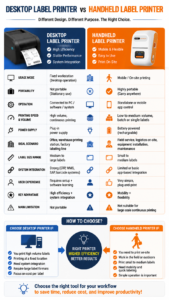
Core Engineering Differences: Portable vs. Desktop Form Factors
Understanding the mechanical and electrical trade-offs between portable and desktop architectures ensures capital investments align with operational demands:
1. Mechanical Footprint, Media Capacity, and Reload Frequency
- Desktop Printers:Built with larger internal chassis, desktop units accommodate industrial-diameter label rolls (typically 4-inch to 5-inch outer roll diameters) and full-length thermal transfer ribbons (74m to 300m lengths). This expanded capacity minimizes downtime associated with consumable changes during continuous, high-volume production shifts.
- Portable Printers:Compact and ergonomic, mobile units are engineered to operate in the palm of a hand or clip onto a tool belt (typically weighing between 250g and 500g). To maintain a lightweight form factor, portable machines utilize compact media rolls (up to 1.5-inch or 2-inch roll diameters) or sealed, all-in-one consumable cassettes that integrate both the resin ribbon and synthetic media into a single drop-in unit.
2. Power Architecture and Operational Independence
- Desktop Units:Rely strictly on stationary AC wall outlets (100–240V). They deliver consistent, uninterrupted thermal energy to high-speed stepper motors and thermal printheads, eliminating concerns over battery degradation during 24/7 continuous operations.
- Portable Units:Powered by integrated high-capacity lithium-ion battery packs (typically 1200 mAh to 2600 mAh). Advanced power-management firmware enables 4 to 8 hours of continuous batch printing and multiple days of standby time. Recharged via standard USB Type-C ports, portable units operate untethered across warehouse aisles, scaffolding, and remote utility vaults.
3. Data Connectivity and User Interfaces
- Desktop Units:Emphasize high-bandwidth stationary connectivity, featuring Ethernet (RJ45), USB Type-B, Wi-Fi, and serial interfaces to integrate directly with factory Enterprise Resource Planning (ERP), Warehouse Management Systems (WMS), and programmable logic controllers (PLCs).
- Portable Units:Prioritize wireless agility via low-latency Bluetooth Low Energy (BLE) and Wi-Fi. Operators control print queues directly from smartphones, tablets, or industrial handheld PDAs using mobile applications, eliminating the need for bulky dedicated PCs at every tagging station.
Technical Comparison: Portable vs. Desktop QR Barcode Printers
| Engineering Dimension | Portable QR Barcode Label Printer | Desktop QR Barcode Label Printer |
| Primary Form Factor | Handheld, belt-clip, or mobile pocket unit | Fixed benchtop workstation unit |
| Average Hardware Weight | 250 g to 450 g (ultra-lightweight) | 1.8 kg to 4.5 kg (stationary) |
| Power Source | Rechargeable Li-ion battery (USB-C) | Constant AC mains power (100–240V) |
| Maximum Media Roll OD | ~40 mm to 50 mm (compact capacity) | ~100 mm to 127 mm (high capacity) |
| Typical Daily Duty Cycle | 100 to 2,000 labels per shift | 2,000 to 15,000+ labels per shift |
| Printhead Resolution Options | 203 DPI or 300 DPI (micro-matrix precision) | 203 DPI or 300 DPI |
| Effective Print Width | Up to 36 mm – 57 mm (1.5″ to 2.2″) | Up to 104 mm (4.1″ logistics standard) |
| Primary Interface Method | Bluetooth BLE to iOS/Android smartphones & PDAs | USB, Ethernet LAN, Wi-Fi to Windows/Linux PCs |
| Target Operational Niche | Mobile asset audits, rack tagging, electrical panels | Central packing docks, shipping staging, intake |
When to Choose a Portable QR Barcode Label Printer
A portable qr barcode label printer is decisively superior when mobility, localized asset tagging, and on-demand flexibility outweigh continuous roll capacity:
- Fixed IT Asset Audits and Data Centers:IT administrators auditing server blades, network racks, and patch panels cannot haul heavy computing hardware back to an office desk. A compact 300 DPI portable unit allows technicians to scan existing serial numbers with a smartphone and print durable Matte Silver PET QR markers directly inside hot-aisle containment zones.
- Field Electrical & Telecom Harness Labeling:Electricians marking control cabinets, solar inverter stations, and telecommunications vaults require lightweight tools. Portable printers with all-in-one drop-in cassettes allow technicians to print serialized QR codes on continuous heat shrink tubing or self-laminating cable wraps while working on ladders or in trenches.
- Dynamic Retail Shelf-Edge Repricing:Retail store clerks updating shelf labels, clearance tags, and promotional QR stickers during floor walks benefit from battery-powered Bluetooth units that fit directly into apron pockets.
- Mobile Inspection and Sample Collection:Clinical researchers and environmental inspectors taking water or specimen samples in the field need to generate unique, verifiable 2D DataMatrix tags immediately at the collection point to maintain strict chain of custody.
When to Choose a Desktop QR Barcode Label Printer
A stationary desktop printer remains the industry standard when high production volume, wide-format compliance labels, and continuous automated batch runs dominate:
- Central Warehouse Receiving & Intake Docks:Inbound logistics receiving hundreds of mixed pallet deliveries per hour requires continuous high-volume printing. Desktop printers accommodate large-diameter rolls, processing thousands of uniform pallet-routing QR codes without stopping for media reloads.
- High-Volume Shipping & Logistics (4×6 Waybills):Standard courier shipping labels (FedEx, UPS, DHL, Maersk) follow the 4×6 inch format. Portable units typically cannot feed media wider than 2 to 3 inches. High-speed desktop units are necessary to output wide-format logistics waybills with combined linear GS1-128 barcodes and 2D customs matrices.
- Automated Manufacturing & Packaging Lines:In industrial assembly lines where labels are peeled and applied continuously to components, desktop printers interface directly with automated labeling applicators and PLC controllers via RS-232 serial or industrial Ethernet connections.
- Heavy Industrial Wide-Format Compliance:Chemical packaging facilities tagging 55-gallon drums and IBC totes with multi-color GHS hazard diamonds and wide regulatory statements demand desktop broad-format architectures.
Recommended Detonger Models for Portable and Desktop Workflows
Detonger leverages 16 years of independent research, global ISO9001 quality certifications, and 11 invention patents to deliver reliable thermal hardware suited for both mobile decentralized operations and fixed industrial packing lines.
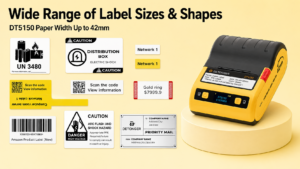
Detonger DT5150: The High-Precision Portable Thermal Transfer Specialist
For field technicians, IT administrators, and laboratory personnel requiring mobile, permanent 2D QR markers on narrow synthetic media, the Detonger DT5150 1.5-inch All-in-One Thermal Transfer Printer delivers benchtop accuracy in a handheld footprint.
- Why it excels for portable QR marking:Featuring an ultra-sharp 300 DPI printhead, the DT5150 outputs microscopic 2D DataMatrix and QR codes on Matte Silver PET, cryogenic films, and heat shrink tubing up to 36mm wide. Its sealed, all-in-one consumable cartridge combines the pure resin ribbon and synthetic media into a single drop-in unit, allowing one-handed reloading in seconds with zero ribbon threading. Integrated Bluetooth connectivity allows mobile teams to stream serialized QR batches directly from smartphones.
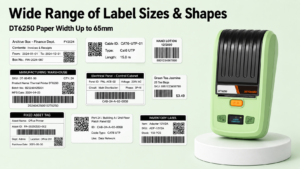
Detonger DT6250: The Versatile Desktop & Benchtop Workhorse
For manufacturing assembly bays, intermediate warehouse desks, and facility management hubs requiring broader media flexibility and durable thermal transfer output, the Detonger DT6250 provides expanded capacity.
- Why it excels for benchtop QR marking:Supporting media widths up to 61mm (2.5 inches) at 300 DPI, the DT6250 outputs large-format equipment rating plates, GHS hazard identifiers, and multi-column QR asset tags. Its split-type consumable architecture separates the ribbon roll from the label stock, substantially reducing ongoing per-label costs during large-scale enterprise tagging operations.
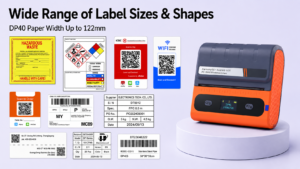
Detonger DP40 Series: High-Throughput Desktop & Mobile 4-Inch Logistics Champion
For 3PL fulfillment centers, cross-dock logistics hubs, and shipping staging lanes where wide 4×6 inch waybills and large pallet QR codes are primary deliverables, the Detonger DP40 Series provides fast, inkless direct thermal output.
- Why it excels for logistics:This 4-inch printer accommodates media widths up to 114mm (104mm effective print width), outputting large, scan-ready shipping QR codes and courier waybills at high speeds. Equipped with dual 2600 mAh battery packs alongside stationary power options, it bridges the gap between desktop capacity and mobile dock flexibility.
Automating QR Production Across Workflows with WePrint Software
Whether deploying portable handhelds or stationary desktop machines, an enterprise qr barcode label printer requires intelligent software to eliminate manual data entry bottlenecks. Detonger hardware integrates natively with the WePrint application across iOS, Android, and Windows PC.
WePrint optimizes QR barcode workflows through dedicated capabilities:
- Dynamic QR Symbology Engine:Generates standard QR codes and Micro-QR formats with customizable Error Correction Levels (ECC Level L, M, Q, or H). Configuring Level H ensures codes remain scannable even if up to 30% of the label surface is scratched or obscured by dirt.
- Excel & CSV Database Binding:Operators can import external spreadsheets containing thousands of unique URLs, serial numbers, or inventory records. WePrint dynamically maps columns to the canvas, rendering unique, scannable QR codes for every record without manual data entry.
- Automated Serialization Counters:For batch runs generated on the fly, WePrint features customizable incrementing rules (such as step values, prefix/suffix additions, and leading zero padding), ensuring synchronized advancing across barcodes and human-readable text.
- Cross-Platform SDK Support:For organizations using proprietary warehouse management or enterprise asset management software, Detonger provides multi-platform SDKs, enabling developers to trigger print jobs across portable Bluetooth units and desktop Ethernet printers from the same centralized application.
Selecting between portable and desktop hardware depends on matching mobility and throughput to your operational demands. Explore Detonger’s specialized Barcode Label Printer for Warehouse, Inventory and Asset Tracking collection, equip your mobile teams with our agile Thermal Label Printer options, or discover our high-durability Industrial Label Printer for Manufacturing, Warehouse and Durable Labels lineup to upgrade your 2D barcode infrastructure today.
Frequently Asked Questions (FAQs)
Q: Can a portable QR barcode label printer achieve the same print quality as a desktop printer?
A: Yes. Print resolution depends on printhead engineering rather than the physical size of the printer casing. High-grade portable models like the Detonger DT5150 utilize native 300 DPI printheads, matching the optical precision and micro-module cell definition of industrial desktop machines down to 10mm x 10mm micro-QR codes.
Q: Why can’t portable label printers print standard 4×6 inch shipping labels?
A: Standard 4×6 inch logistics labels require an effective printhead width of at least 104mm (4.1 inches) plus heavy platen mechanics to feed large paper rolls. Building a battery-powered device wide enough to house 4-inch mechanisms increases device weight and bulk, making true one-handed operation impractical. For 4-inch wide-format shipping labels, desktop or heavy-duty mobile dock printers like the Detonger DP40 Series are recommended.
Q: How does battery life affect print darkness on portable thermal printers?
A: In low-end consumer label makers, print contrast degrades as battery voltage drops. Professional commercial portable printers incorporate intelligent voltage-regulation circuitry and constant-current printhead drivers. This firmware monitors battery state-of-charge and dynamically adjusts thermal pulse widths to ensure the first and five-hundredth label maintain identical optical contrast and barcode scannability.