

A qr barcode label printer optimized for variable data is a specialized thermal device engineered for manufacturing plants, logistics hubs, and retail enterprises to automatically generate unique, serialized 1D and 2D codes on every successive tag. The most critical selection factors for processing dynamic datasets include seamless database integration (via Excel or ERP systems), high-capacity onboard processing to prevent data bottlenecks, and high-resolution printheads (300 DPI) to ensure microscopic QR modules render flawlessly as the data changes from label to label. Users should initially judge their requirements by evaluating their data source and output volume: if you are generating hundreds of unique anti-counterfeiting QR codes or sequential asset serial numbers, deploying a smart thermal printer natively integrated with robust batch-processing software is the only way to eliminate manual entry errors.
The Operational Advantage of Variable Data Printing (VDP)
In legacy labeling operations, printing 1,000 labels meant printing the exact same static image 1,000 times. Modern supply chain traceability, anti-counterfeiting protocols, and targeted marketing campaigns require Variable Data Printing (VDP).
VDP allows specific elements on a label template—such as a 1D barcode, a 2D QR code, a batch number, or an expiration date—to change automatically from one label to the next without stopping the print job. For example, a manufacturer can print 500 product tags where the central QR code on each tag directs the consumer to a unique, serialized warranty registration page. A dedicated qr barcode label printer executes this by pulling live data from a spreadsheet or cloud database, converting that alphanumeric data into a scannable graphic in milliseconds, and printing it seamlessly.
Key Hardware Specifications for Dynamic Data
Processing and printing unique QR codes at high speeds demands specific hardware capabilities. B2B decision-makers must evaluate printers based on these technical criteria:
- 300 DPI Print Resolution:A QR code is a complex grid of square modules. When the data embedded in the QR code changes (especially if the character count increases), the squares become denser and smaller. A 203 DPI printhead will cause these shifting micro-squares to blur together, resulting in failed scans. A 300 DPI resolution guarantees razor-sharp edge definition regardless of the data density.
- Smart Memory and Processing Power:Generating unique graphics for every single label requires rapid data processing. The printer must possess sufficient internal buffer memory to receive, process, and output continuous streams of variable data without stuttering or pausing between labels.
- Thermal Transfer and Direct Thermal Adaptability:Your hardware must match the lifespan of the data. For temporary variable data (like shipping addresses or daily price changes), direct thermal printing is cost-effective. For permanent variable data (like serialized asset tags or long-term warranty QR codes), the printer must support thermal transfer technology to melt durable resin onto synthetic substrates.
Durability Comparison for Variable Data Labels
Matching the thermal technology to the lifespan of your variable data is critical for cost-efficiency:
| Labeling Application | Recommended Technology | Consumables Required | Environmental Durability |
| E-commerce Shipping (Variable Addresses & Routing Codes) | Direct Thermal | 3-Proof Direct Thermal Paper | Moderate (Survives rain and transit friction) |
| Retail Pricing (Variable Daily Discounts & Flash Sales) | Direct Thermal | Standard Direct Thermal Paper | Low (Indoor, short-term retail environments) |
| IT Asset Tracking (Serialized DataMatrix Codes) | Thermal Transfer | Matte Silver PET + Resin Ribbon | Extreme (Impervious to alcohol and handling) |
| Manufacturing (Unique Anti-Counterfeiting QR Codes) | Thermal Transfer | Tamper-Evident VOID + Resin Ribbon | Extreme (Resists harsh solvents and UV fading) |
Expert Recommendations: Detonger Hardware for VDP
Selecting the appropriate hardware involves aligning the machine’s processing capabilities with your label width requirements. Detonger provides purpose-built, ISO9001-certified hardware specifically designed to handle high-volume variable data.
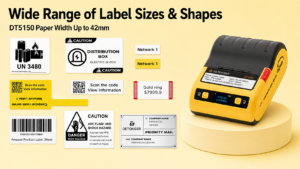
Detonger DT5150: The Compact Serialized Asset Specialist
For IT departments, electronics manufacturers, and laboratories printing unique serial numbers, the Detonger DT5150 is the optimal agile solution.
- Why it fits variable data:This 1.5-inch All-in-One Thermal Transfer Printer features a high-definition 300 DPI printhead. It effortlessly processes variable DataMatrix codes and serialized alphanumeric strings onto narrow 15mm to 36mm tags. Its drop-in cassette system allows technicians to rapidly deploy tamper-proof Silver PET tags for fixed-asset tracking without manual ribbon threading.
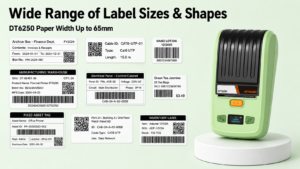
Detonger DT6250: The Professional Manufacturing Solution
For industrial production lines requiring wider compliance tags with dynamic data, the Detonger DT6250 offers expanded capacity.
- Why it fits variable data:Supporting label widths up to 61mm, this 300 DPI thermal transfer unit provides ample canvas space for complex layouts. It can simultaneously process a static company logo alongside a variable 1D warehouse routing barcode and a unique 2D QR code for product registration, making it ideal for electronics and automotive parts manufacturing.
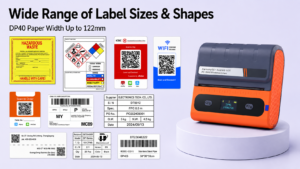
Detonger DP40 Series: The High-Volume Logistics Workhorse
For 3PL warehouses and high-volume e-commerce dispatchers managing thousands of unique daily orders, the Detonger DP40 Series is unmatched.
- Why it fits variable data:This 4-inch direct thermal printer easily outputs standard 4×6 inch shipping labels. It features robust internal processing to handle rapid streams of variable recipient addresses and unique carrier routing barcodes at high speeds, ensuring peak-season fulfillment continues without bottlenecks.
Executing Variable Data with Weprint Software
Hardware cannot process variable data without intelligent software mapping. Detonger printers integrate natively with our proprietary Weprint software ecosystem, accessible on iOS, Android, and PC.
Weprint is engineered specifically for VDP operations. Through the software’s intuitive Excel import feature, users can map specific spreadsheet columns directly to barcode elements on the digital canvas. For example, Column A (Batch ID) can be mapped to a 1D Code 128 barcode, while Column B (Unique Web URL) is mapped to a 2D QR code. With a single tap, the software processes the entire spreadsheet, transmitting hundreds of unique, perfectly formatted labels to the printer in seconds. Detonger also provides comprehensive SDKs and APIs, allowing enterprise IT teams to trigger automated variable printing directly from custom ERP or WMS platforms.
By deploying a dedicated qr barcode label printer equipped with 300 DPI precision and dynamic software integration, your business can seamlessly track every unique asset, product, and parcel. Explore our complete Barcode Label Printer for Warehouse, Inventory and Asset Tracking collection to upgrade your data tracking infrastructure today.
Frequently Asked Questions (FAQs)
Q: Can a standard office printer handle variable data QR codes?
A: While office laser or inkjet printers can theoretically print variable data via mail-merge functions, they are highly inefficient for labeling. They require printing on full A4 sticker sheets, resulting in massive label waste if you only need to print 5 or 10 unique tags. A dedicated thermal label printer outputs one tag at a time, on-demand, with zero media waste.
Q: Do I need to manually generate a new QR code image for every single label?
A: No. That is the primary benefit of variable data software like Weprint. You do not need to upload 1,000 different QR code images. You simply upload an Excel spreadsheet containing 1,000 different text strings or URLs. The software automatically encodes each line of text into a unique QR code graphic in real-time right before it prints.
Q: Why do my variable QR codes sometimes fail to scan when the data string gets longer?
A: The more data (characters) you pack into a QR code, the denser and more complex the grid of black-and-white squares becomes. If you are using a lower-resolution 203 DPI printer, these microscopic squares will blur together as they shrink to fit the label, causing scanner failure. Upgrading to a 300 DPI printer ensures these complex, data-heavy QR codes remain perfectly sharp.