
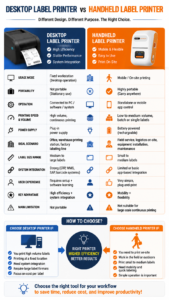
A handheld label maker is a compact, battery-powered thermal printing device engineered for retail staff, field technicians, and warehouse workers to generate scannable identification tags directly at the point of application. Conversely, a desktop label printer is a stationary, AC-powered workhorse designed for dedicated packing stations and continuous, high-volume output. The most critical selection factors when choosing between these two form factors are operational mobility, daily print volume, and required media width. Decision-makers must evaluate their physical workflows: if your team loses billable hours walking back and forth to a centralized office to retrieve printed tags for IT servers or retail shelves, deploying an agile, Bluetooth-enabled handheld device is a mandatory operational upgrade.
Decentralizing Operations with a Handheld Label Maker
In traditional environments, relying exclusively on a centralized desktop printer creates massive operational bottlenecks. A worker must estimate how many tags they need, print them in the back office, and carry them to the warehouse aisle or sales floor. If a price changes, a barcode is dropped, or a cable requires a different naming convention, the worker must halt their task, return to the office, retype the data, and reprint the tag.
A dedicated handheld label maker completely eliminates this friction. Weighing under 400g, these mobile devices fit in an apron pocket or hang securely from a toolbelt. By utilizing a wireless Bluetooth connection to a smartphone or industrial PDA, floor staff can scan a product, pull live data from the cloud inventory system, and print a standardized, inkless tag instantly. This decentralized form factor is the undisputed champion for tagging localized IT assets, executing retail flash sales, and marking complex electrical panels where on-the-spot accuracy is paramount.
When to Rely on a Desktop Label Printer
While mobility is crucial for agile tracking, desktop printers dominate environments characterized by stationary, high-volume production and massive tag dimensions.
If your facility operates a dedicated e-commerce fulfillment desk processing thousands of 4×6 inch courier waybills per shift, a desktop printer is strictly required. These stationary machines feature massive internal media compartments, allowing them to hold large industrial rolls of 1,000+ labels, significantly reducing the labor downtime spent reloading consumables. Furthermore, desktop units are typically hardwired via Ethernet or USB directly to fixed Point of Sale (POS) systems or Warehouse Management Systems (WMS), providing the uninterrupted, high-speed output necessary for automated packing conveyor lines.
Technical Comparison: Handheld vs. Desktop Hardware
To secure the highest return on investment, B2B buyers must align their hardware procurement directly with their facility’s physical constraints and label sizes.
| Feature / Metric | Commercial Handheld Label Maker | Industrial Desktop Label Printer |
| Mobility & Power | Fully portable, lithium-ion battery powered | Stationary, requires an AC wall outlet |
| Maximum Print Width | Typically 15mm to 57mm (0.5 to 2.2 inches) | 104mm to 168mm+ (4 to 6 inches) |
| Consumable Capacity | Small diameter rolls (frequent reloading in high volume) | Large industrial rolls (minimizes reloading downtime) |
| Primary Connectivity | Bluetooth, Wi-Fi via Smartphone/Tablet | USB, Ethernet, Serial via PC/Server |
| Ideal Business Use Case | Retail shelves, IT cables, boutique pricing, laboratory vials | E-commerce packing desks, pallet labeling, manufacturing lines |
Expert Mobile Solutions from Detonger
When workflow agility is the priority, Detonger provides purpose-built, ISO9001-certified mobile hardware designed to replicate desktop precision in the palm of your hand.
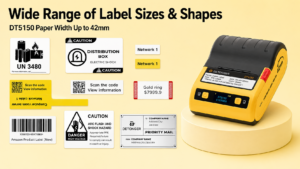
- Detonger DT5150 (The Agile Asset Specialist):This ultra-compact 1.5-inch thermal transfer handheld label maker is the ultimate tool for IT departments and clinical laboratories. Outputting at a high-definition 300 DPI, it generates razor-sharp micro-QR codes on narrow Silver PET tags. Its one-piece consumable cassette ensures field workers can reload resin ribbons and synthetic labels in seconds without dealing with the complex threading mechanisms found in desktop units.
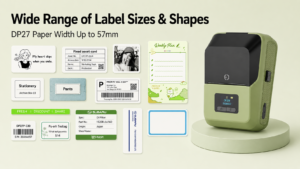
- Detonger DP27 Series (The Retail Champion):Weighing just 292g, this direct thermal unit allows boutique owners and supermarket staff to instantly print pricing tags and promotional stickers directly on the sales floor with zero ink costs.
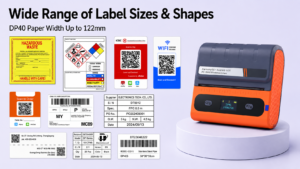
- Bridging the Gap (Detonger DP40 Series):For warehouses needing desktop-level 4×6 inch shipping labels but requiring forklift mobility, the DP40 portable printer offers the wide-format capacity of a desktop unit, powered by dual 2600 mAh batteries for true loading-dock agility.
Hardware agility must be paired with intelligent software to eliminate manual typing errors. Detonger mobile printers integrate natively with the proprietary Weprint app, available on iOS, Android, and PC. This allows operations managers to import comprehensive equipment registers or pricing lists directly from Excel. Field workers simply connect via Bluetooth, load the custom template on their phone, and batch-print hundreds of serialized asset tags or pricing labels in minutes, seamlessly bridging the gap between digital databases and physical inventory.
Frequently Asked Questions (FAQs)
Q: Can a handheld label maker print standard 4×6 shipping labels?
A: Standard handheld models (which typically support 0.5-inch to 2-inch widths) cannot print 4×6 shipping labels. For shipping labels, you need a desktop printer or a heavy-duty portable/mobile printer (like the Detonger DP40) specifically designed with a 4-inch printhead and media compartment.
Q: Do handheld label makers use ink cartridges like desktop inkjet printers?
A: No. Commercial handheld units utilize thermal printing technology, which requires zero liquid ink. Direct thermal models use heat to activate chemicals within the paper itself. Thermal transfer models use a heated printhead to melt a solid resin or wax ribbon onto a synthetic label. You will never need to replace messy ink cartridges.
Q: How do I connect a handheld label maker to my computer or phone?
A: Modern handheld label makers connect directly to smartphones and tablets via local Bluetooth or Wi-Fi. By downloading a companion app (like Weprint), you can design and print labels wirelessly. Some models also support a wired USB connection to a Windows PC if desktop operation is temporarily required.