
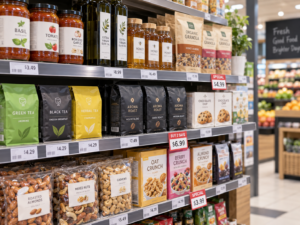
A price labels printer is a compact, high-speed mobile thermal device engineered for retail store managers, supermarket staff, and boutique owners to execute real-time, scannable pricing updates directly on the sales floor. The most critical selection factors for fast in-store updates include inkless direct thermal technology (for rapid, low-cost output), ergonomic portability, and intelligent smartphone integration. Retailers should initially evaluate their daily update volume and shelf configuration: if your store executes daily flash sales, seasonal promotions, or dynamic inflation pricing across thousands of SKUs, deploying a Bluetooth-enabled portable printer paired with cloud-synced inventory software is the only way to eliminate checkout discrepancies and massive labor costs.
The Bottleneck of Centralized Retail Pricing
In highly dynamic retail environments, pricing accuracy dictates consumer trust and profit margins. Relying on centralized back-office laser printers or manual handwriting to update shelf edges is a massive operational liability.
When a store implements a flash sale, floor staff traditionally have to walk to the back office, print sheets of A4 sticker labels, walk back to the aisles, and hunt for the corresponding products. This fragmented workflow often results in pricing mismatches between the physical shelf and the digital Point of Sale (POS) system. A dedicated price labels printer decentralizes this entire operation. By wearing a lightweight, battery-powered printer on a belt clip, floor staff can walk the aisles, scan an existing product barcode with their smartphone, pull the new price from the central database, and instantly print a high-contrast replacement tag right at the shelf.
Key Hardware Specifications for Fast In-Store Updates
Procuring hardware for high-volume retail requires prioritizing speed, consumable costs, and media flexibility. B2B buyers and store owners should evaluate hardware based on these specific commercial criteria:
- Inkless Direct Thermal Technology:For standard indoor retail pricing, thermal transfer (using ribbons) is unnecessary. The optimal retail hardware is a direct thermal printer, which applies heat directly to chemically treated paper. This eliminates the need to buy, load, or clean ink cartridges and toners, drastically lowering your cost-per-label and maximizing printing speed.
- Adjustable Print Widths:Retail shelving requires diverse tag sizes. A boutique might need a narrow 15mm tag for a clothing swing ticket, while a grocery aisle requires a wide 60mm to 80mm label to display the product name, unit price, barcode, and promotional graphics. Your hardware must feature adjustable internal media guides to switch between these formats in seconds.
- Print Resolution (203 DPI vs. 300 DPI):While 203 DPI is the industry standard and perfectly sufficient for bold prices and 1D UPC barcodes, luxury retailers (selling cosmetics, electronics, or jewelry) often utilize dense 2D QR codes linking to digital product specs. If printing micro-QR codes on tiny tags, a 300 DPI printhead is strictly required to prevent scanning failures.
- High-Capacity Battery Endurance:Retail staff cannot stop mid-shift to charge their devices. Look for portable units equipped with 1500 mAh to 2600 mAh lithium-ion batteries capable of sustaining continuous batch printing throughout a rigorous 8-to-10-hour retail shift.
Thermal Tech in Retail: Direct Thermal vs. Thermal Transfer
While direct thermal is the standard for fast updates, certain premium retail goods require a different approach:
| Retail Application | Recommended Print Technology | Consumables Required | Expected Label Lifespan |
| Supermarket Shelf Edges, Clothing Tags, Bakeries | Direct Thermal | Direct Thermal Paper | 6 to 12 months (Indoor) |
| Refrigerated Grocery (Meat, Dairy, Cold Beverages) | Direct Thermal (3-Proof) | Top-Coated Waterproof Thermal Paper | 6 to 12 months (Moisture-resistant) |
| Fine Jewelry, Luxury Eyewear, High-End Cosmetics | Thermal Transfer | Synthetic PET Labels + Resin Ribbon | 5 to 10+ years (Friction & oil-proof) |
Top Detonger Printers for Retail Pricing
Selecting the right device requires matching the machine’s media capacity to your store’s physical shelving architecture. Detonger provides purpose-built, ISO-certified hardware designed specifically for the retail sector.
Detonger DP27 Series: The Agile 2-Inch Boutique Solution
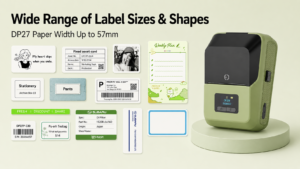
For independent boutiques, pharmacies, and small grocers, the Detonger DP27 Series provides unmatched agility for fast pricing updates.
- Why it fits retail workflows:Weighing only 292g, this 2-inch direct thermal printer is effortless for staff to carry all day. It supports label widths up to 57mm, making it perfect for printing sharp 1D barcodes and promotional “Sale” stickers. Its built-in TFT screen allows users to easily monitor printer status and battery life directly on the sales floor.
Detonger DP300 Series: The Wide-Format Supermarket Workhorse
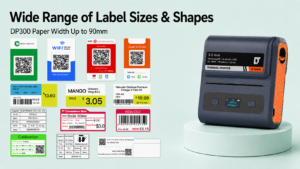
If you manage a hardware shop, convenience store, or larger retail space utilizing wide shelf-edge tracking profiles, the Detonger DP300 Series offers an expanded 3.3-inch print capacity.
- Why it fits retail workflows:Accommodating label widths from 25mm up to 90mm, the DP300 empowers managers to print massive, highly visible “Clearance” tags that instantly grab consumer attention. Models equipped with dual 2600 mAh batteries can easily handle massive batch-printing jobs during seasonal store-wide pricing overhauls.
Automating Updates with Mercury Shop Software
The operational speed of a price labels printer is dictated by its software. Detonger hardware pairs seamlessly with our proprietary Mercury Shop App, an intelligent platform developed specifically for retail price management on iOS, Android, and PC.
Mercury Shop allows store managers to completely bypass manual keyboard entry. Floor staff can use their smartphone camera to scan a product’s barcode, instantly pulling the live pricing data from the cloud database, and generating an updated shelf tag in one tap. For massive inventory changes, managers can import hundreds of updated prices in bulk via Excel. The software maps the spreadsheet to your custom shelf tag template, allowing staff to batch-print hundreds of serialized barcode tags in minutes.
Upgrading your pricing infrastructure is a strategic maneuver that secures profit margins, enhances customer trust, and saves thousands of labor hours annually. By prioritizing mobile direct thermal hardware and leveraging intelligent cloud-syncing software, your retail team can manage dynamic inventory effortlessly. Explore our highly-rated Portable Label Printer and Handheld Label Maker for Small Business collection, or discover our high-efficiency Thermal Label Printer lineup today.
Frequently Asked Questions (FAQs)
Q: Do I need to buy ink to update my retail price tags?
A: No. A direct thermal price labels printer uses controlled heat from the printhead to activate specially treated chemical paper. You never have to buy, replace, or clean messy ink cartridges or toners. You only need to purchase the thermal label rolls, ensuring a very low cost-per-label for your store.
Q: How do I print price tags for items stored in commercial refrigerators or freezers?
A: Standard economy thermal paper will absorb moisture in a refrigerator, causing the label to become mushy and the barcode to blur. For refrigerated items, you must use “three-proof” (waterproof, oil-proof, scratch-proof) top-coated direct thermal paper paired with a freezer-grade adhesive to ensure the tag remains securely attached and scannable in high-condensation environments.
Q: Can a portable printer integrate directly with my store’s Point of Sale (POS) system?
A: Yes. Advanced commercial printers like the Detonger DP series provide comprehensive SDKs (Software Development Kits) and APIs. This allows your software provider or IT team to integrate the printer natively into your existing POS or ERP system, enabling automated, real-time price printing directly from your main inventory database.