
A thermal transfer label printer is an industrial-grade thermal device engineered for e-commerce dispatchers, 3PL distribution centers, and freight handlers to generate high-durability, scannable shipping waybills that survive extreme logistics environments. While standard direct thermal printers dominate high-turnover domestic parcel shipping due to their inkless simplicity, thermal transfer technology is essential for cross-border maritime freight, hazardous chemical transit, cold-chain transport, and extended outdoor staging. By melting a solid ink ribbon directly into a durable label substrate, this printing method creates permanent markings immune to UV exposure, friction, and moisture. Successfully utilizing a thermal transfer system for logistics requires matching the ribbon chemistry to your label media, properly setting printhead energy parameters, and driving the workflow through intelligent batch-processing software.
Step 1: Select the Appropriate Ribbon and Label Substrate
The foundational advantage of a thermal transfer label printer lies in its two-component consumable architecture: an ink ribbon and a receptive label stock. Selecting the wrong combination will cause flaking, smearing, or illegible barcodes during transit.
- Wax Ribbons (Standard Coated Paper):The most cost-effective thermal transfer combination, ideal for standard corrugated shipping cartons stored indoors or moving through routine dry transit routes. Wax ribbons offer better scratch resistance than basic direct thermal paper, but they remain vulnerable to heavy moisture and chemical contact.
- Wax-Resin Ribbons (Coated Paper or Intermediate Synthetics):A hybrid formulation providing superior abrasion resistance and moisture tolerance. This is the optimal selection for standard courier waybills (e.g., FedEx, UPS, DHL) moving through mixed-weather cross-dock facilities, pallet-racking tags, and refrigerated transit.
- Pure Resin Ribbons (Synthetic Films like PET or Polypropylene):Mandatory for extreme industrial shipping, chemical drum identification (GHS/BS5609 compliance), and open-deck maritime transport. Pure resin forms an impenetrable polymer bond with synthetic films, withstanding complete saltwater submersion, harsh cleaning solvents, and prolonged solar UV radiation without degradation.
Step 2: Calibrate Hardware Settings and Media Alignment
Thermal transfer printing relies on mechanical pressure and thermal transfer energy to melt the ribbon evenly. To set up your machine for flawless shipping barcode production:
- Thread the Media and Ribbon Paths:Ensure the coated ink side of the ribbon faces the receptive side of the shipping labels (Face-Out or Face-In, depending on the printer’s spindle configuration). The ribbon must travel smoothly over the printhead without diagonal creases, which cause horizontal white lines through barcodes.
- Calibrate Optical Media Sensors:Shipping label rolls typically feature a transmissive gap or a reflective black mark along the liner. Engage the printer’s sensor auto-calibration function so the platen roller registers the exact top-of-form boundary for every tag, preventing address text from drifting across perforations.
- Optimize Heat (Darkness) and Print Speed:Because melting solid resin requires higher thermal energy than activating direct thermal paper, adjust the print darkness (burn temperature) in your driver or software. Set the speed to a balanced 100 mm/s to 150 mm/s to ensure clean barcode line edge definition without ribbon burn-through.
Step 3: Automate Dispatch Batches with WePrint Software
Manually entering recipient addresses and tracking numbers causes massive fulfillment bottlenecks. Detonger hardware integrates natively with our proprietary WePrint application across iOS, Android, and Windows PC.
- Excel and CSV Database Integration:Export daily dispatch manifests directly from your ERP, WMS, or e-commerce platform (e.g., Shopify, Amazon, WooCommerce). Import the spreadsheet directly into WePrint to map tracking numbers, recipient names, postal routing codes, and delivery addresses to standardized 4×6 inch (100x150mm) or custom logistics templates.
- Dynamic Barcode Generation:WePrint automatically converts alphanumeric tracking codes into compliant 1D symbologies (such as Code 128 or GS1-128) and 2D matrices (such as PDF417 or QR codes) with verified quiet zones, ensuring instantaneous reads under automated sorter scanners.
- Batch Output via Wireless Connectivity:Connect via Bluetooth or Wi-Fi to batch-print hundreds of serialized, heavy-duty shipping labels directly at the staging lane or loading dock.
Direct Thermal vs. Thermal Transfer for Shipping Logistics
| Operational Metric | Direct Thermal Printing | Thermal Transfer Printing (Wax-Resin/Resin) |
| Imaging Mechanism | Heat activates chemical coating on paper | Printhead melts solid ribbon onto label facestock |
| Consumable Requirement | Direct thermal paper roll only | Label stock (paper or synthetic) + ink ribbon |
| Heat & Sunlight Resistance | Fails (turns black under truck heat or sunlight) | High to Extreme (unaffected by heat, UV, or climate) |
| Moisture & Abrasion Tolerance | Low to Moderate (standard paper smears; 3-proof paper beads water) | Exceptional (withstands rain, ocean spray, and friction) |
| Archive & Transit Lifespan | 1 to 6 months (temporary delivery) | 1 to 10+ years (permanent tracking & export) |
| Primary Logistics Use Case | Domestic last-mile parcel delivery | Cross-border freight, ocean shipping, chemical cargo |
Recommended Detonger Hardware for Industrial Shipping
Detonger leverages 16 years of independent research, global ISO9001/CE certifications, and 11 invention patents to deliver reliable thermal hardware suited for logistics and compliance labeling.
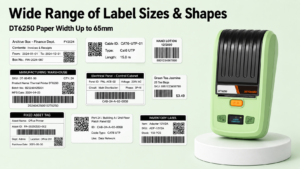
Detonger DT6250: Multi-Format Logistics and Export Workhorse
For freight forwarders, intermediate shipping docks, and manufacturing plants requiring wide-format compliance and waybill printing, the Detonger DT6250 delivers commercial versatility.
- Why it excels for shipping:Supporting media widths up to 61mm (2.5 inches) at a sharp 300 DPI resolution, the DT6250 outputs crisp international tracking codes, GHS hazard diamonds, and component shipping tags. Its split-type consumable architecture separates the ribbon roll from the label roll, allowing dispatchers to load cost-effective bulk rolls of durable synthetic stock and wax-resin ribbons.
Detonger DT7330: Heavy-Duty Industrial Wide-Format Solution
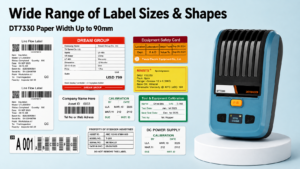
For heavy industrial machinery dispatch, chemical barrel shipping, and palletized cargo tracking, the Detonger DT7330 offers an expanded 3-inch wide-format capability.
- Why it excels for shipping:Built for demanding warehouse environments, the DT7330 accommodates wide synthetic labels and high-capacity ribbon cores. Its advanced media sensors ensure precise registration of serialized shipping barcodes and regulatory compliance text, maintaining reliable print quality across extended production shifts.
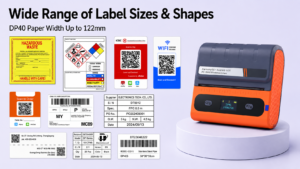
Detonger DP40 Series: The High-Volume Direct Thermal Alternative
For standard domestic e-commerce operations prioritizing high-speed parcel delivery over extreme chemical resistance, the Detonger DP40 Series provides an inkless alternative.
- Why it excels for shipping:This 4-inch direct thermal printer handles standard 4×6 courier waybills. Powered by dual 2600 mAh batteries, warehouse personnel can print waterproof “three-proof” shipping labels directly on forklifts or at loading bays via Bluetooth.
Deploying a professional thermal transfer label printer safeguards your supply chain against unreadable barcodes, misrouted freight, and carrier relabeling surcharges. Explore Detonger’s specialized Shipping Label Printer for E-commerce, Warehouse and Logistics collection, equip your dispatch teams with our versatile Thermal Label Printer options, or optimize your facility with our Efficient Warehouse Label Printing solutions today.
Frequently Asked Questions (FAQs)
Q: Why should I choose thermal transfer over direct thermal for shipping labels?
A: Direct thermal printing is suitable for domestic parcels delivered within days. However, direct thermal paper darkens and turns black when exposed to heat inside delivery vans or direct sunlight, and standard paper dissolves under heavy rain. Thermal transfer uses an ink ribbon to melt wax or resin into the label, ensuring the barcode remains fully legible across months of ocean shipping, outdoor staging, and extreme temperature swings.
Q: Can a thermal transfer printer also print without a ribbon?
A: Many thermal transfer printers can operate in direct thermal mode if you load direct thermal paper. However, if you are loading standard non-thermal paper or synthetic film, you must install an ink ribbon; otherwise, the heated printhead will have no ink to transfer, resulting in completely blank labels.
Q: What print resolution is recommended for international logistics shipping labels?
A: While 203 DPI is standard for large 4×6 inch domestic courier labels, 300 DPI is strongly recommended for international freight and industrial component shipping. International waybills often combine dense 2D DataMatrix codes, customs declarations, and fine typography on a compact label surface, which requires 300 DPI to prevent optical scanning failures.