
An asset label printer is an essential piece of industrial thermal hardware designed to help IT administrators, facility managers, and financial controllers generate permanent, scannable identification markers for physical capital equipment. Whether tracking data center server blades, warehouse forklifts, healthcare diagnostics gear, or corporate laptops, an effective fixed asset management workflow relies entirely on the durability and scannability of the physical tag. The most critical hardware selection criteria for asset tagging include the thermal imaging mechanism (thermal transfer is legally and operationally mandatory for multi-year durability), optical resolution (300 DPI is required for microscopic 2D DataMatrix and QR codes on compact electronics), and substrate compatibility (handling tamper-evident VOID films and synthetic Matte Silver PET). Business buyers should first evaluate their deployment environment: if your equipment faces routine cleaning with solvents, heavy handling, or multi-year depreciation lifecycles, investing in a high-resolution thermal transfer unit loaded with pure resin ribbon is the only way to eliminate unreadable barcodes and costly inventory write-offs.
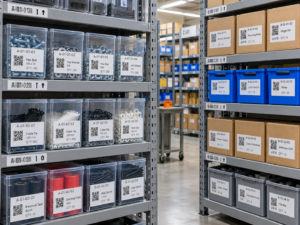
The Operational Risk of Inadequate Asset Identification
Fixed asset tracking directly underpins accounting depreciation, loss prevention, regulatory compliance, and equipment maintenance schedules. In enterprise environments, relying on generic office laser printers, consumer inkjet sheets, or basic direct thermal tags creates severe vulnerabilities across your ledger.
Standard paper labels absorb moisture and tear easily. Under frequent friction, handling oils, and office cleaning solvents like isopropyl alcohol, standard inkjet and toner inks smear or flake away within weeks. Direct thermal labels pose an even greater risk: because they rely on heat-sensitive chemical paper coatings, ambient heat inside server chassis or sunlight exposure through office windows will cause the entire tag to turn solid black, obliterating serial numbers and barcodes.
When an asset tag fails, auditing physical property requires manual reconciliation, leading to “ghost assets” on balance sheets and delayed warranty claims. A purpose-built asset label printer resolves this issue entirely. By utilizing controlled thermal transfer technology to fuse solid resin ribbons into synthetic substrates, these machines create permanent markers that endure abrasion, chemical wipe-downs, and years of physical handling without degradation.
Core Hardware Specifications to Evaluate
Selecting the right hardware for asset identification requires balancing mechanical precision with material durability. Enterprise buyers should evaluate potential machines against four primary criteria:
- Thermal Transfer vs. Direct Thermal Technology:Direct thermal printing is strictly limited to short-life logistics (such as courier waybills). For fixed assets intended to last 3 to 10+ years, your device must be a thermal transfer label printer. The heated printhead melts an industrial-grade pure resin ribbon into a synthetic film, forming an archival-quality chemical bond that resists solvents, hydraulic oils, cleaning alcohol, and UV exposure.
- 300 DPI High-Resolution Printhead:Capital assets often provide minimal flat surface area for labeling. Laptops, test tubes, optical devices, and circuit boards require small 15mm to 25mm tags containing human-readable serial numbers, corporate logos, and high-density 2D barcodes (such as DataMatrix or QR codes). A standard 203 DPI printhead produces coarse dots that blur microscopic 2D cells together. A 300 DPI printhead delivers crisp edge definition, ensuring immediate optical scan rates under industrial imagers and smartphone cameras.
- Support for Specialized Synthetic Substrates:Asset marking demands media far tougher than paper. The printer must reliably feed durable substrates such as Matte Silver PET (polyester), flexible PVC, and tamper-evident VOID films. Tamper-evident materials leave a visible checkerboard pattern on the equipment chassis if removal is attempted, deterring asset theft and tag swapping.
- Form Factor and Deployment Agility:Consider where tagging occurs. If IT staff must catalog newly unboxed hardware across multiple campus buildings, dragging server racks to a centralized office printer creates bottlenecks. An agile, battery-powered portable printer equipped with Bluetooth connectivity allows technicians to apply serialized markers directly at the server cabinet or desktop workstation.
Comparison: Asset Tagging Technologies and Media
| Evaluation Parameter | Direct Thermal (Standard Paper) | Thermal Transfer (Wax/Resin Ribbon) | Thermal Transfer (Pure Resin + Synthetic PET) |
| Imaging Mechanism | Heat activates chemical coating on paper | Printhead melts wax/resin blend onto synthetic paper | Printhead melts solid resin into synthetic PET film |
| Chemical & Solvent Resistance | Zero (erased instantly by alcohol or oils) | Moderate (withstands light smudging) | Extreme (impervious to isopropyl alcohol, oils, cleaners) |
| UV & Direct Heat Stability | Fails completely (turns black under heat/sun) | Moderate (can fade under prolonged UV exposure) | Archival quality (remains sharp for 5 to 10+ years) |
| Tamper-Evident VOID Support | No (paper tears irregularly) | Limited | Full support (clean substrate transfer) |
| Typical Target Application | Temporary visitor badges, shipping labels | Indoor file storage, short-cycle bin tags | Enterprise IT gear, industrial machinery, lab assets |
Recommended Detonger Models for Business Asset Labeling
Detonger leverages 16 years of independent research, global ISO9001/CE certifications, and 11 invention patents to deliver robust thermal hardware engineered for enterprise inventory and compliance workflows.
Detonger DT5150: The Portable IT Asset Specialist
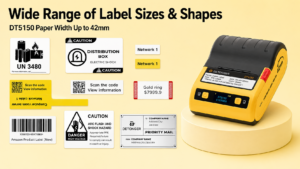
For IT departments, telecommunications teams, and electronics repair facilities tagging laptops, server blades, and office monitors, the Detonger DT5150 1.5-inch All-in-One Thermal Transfer Printer provides unmatched field agility.
- Why it excels for asset tagging:The DT5150 features an ultra-sharp 300 DPI printhead designed to render microscopic 2D QR codes and DataMatrix symbols on narrow tags down to 15mm wide. Its sealed, all-in-one consumable cassette integrates the pure resin ribbon and synthetic Silver PET or VOID label roll into a single cartridge, allowing technicians to reload consumables in seconds without touching delicate ribbons or exposing the printhead to workplace dust.
Detonger DT6250: The Multi-Department Facility Workhorse
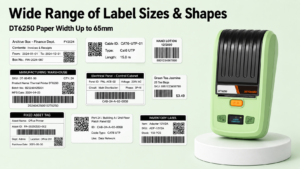
For facility managers, hospital asset controllers, and warehouse supervisors managing larger equipment, AV gear, and industrial tooling, the Detonger DT6250 delivers expanded width and media flexibility.
- Why it excels for asset tagging:Supporting media widths up to 61mm (2.5 inches) at 300 DPI, the DT6250 provides ample printable area for prominent company ownership branding, human-readable serial numbers, property contact information, and large-format barcodes. Its split-type architecture separates the ribbon supply from the label roll, lowering the ongoing cost-per-label during high-volume enterprise asset overhauls.
Automating Asset Tracking with WePrint Software
A dedicated asset label printer requires intelligent software to eliminate manual data entry errors. Detonger hardware integrates natively with the WePrint application across iOS, Android, and Windows PC.
WePrint streamlines enterprise asset management through targeted capabilities:
- Excel & ERP Database Synchronization:IT directors can export fixed asset registers from platforms like SAP, ServiceNow, or Jira into standard Excel or CSV spreadsheets. WePrint automatically maps database columns directly to pre-configured asset tag templates, generating hundreds of serialized tags with zero manual typing.
- Dynamic Incremental Sequencing:For field technicians registering uncataloged inventory on the fly, WePrint provides automated counters with customizable prefixes, suffixes, and zero-padding (e.g., CORP-IT-0001 through CORP-IT-9999).
- Encrypted Barcode & URL Embedding:The software easily encodes web URLs directly into 2D QR codes, enabling maintenance technicians to scan an equipment tag with a smartphone and immediately access service logs, warranty details, and user manuals.
Investing in a purpose-built asset label printer prevents inventory discrepancies, simplifies tax depreciation audits, and secures physical equipment against tampering and theft. Explore Detonger’s specialized Barcode Label Printer for Warehouse, Inventory and Asset Tracking collection, or discover our high-durability Industrial Label Printer for Manufacturing, Warehouse and Durable Labels lineup to equip your business with professional-grade asset marking solutions today.
Frequently Asked Questions (FAQs)
Q: Can I use an asset label printer to make tamper-evident labels for expensive laptops?
A: Yes. Advanced thermal transfer printers like the Detonger DT5150 support tamper-evident “VOID” synthetic label stock. When printed with a pure resin ribbon, these tags remain sharp and scratch-resistant. If an unauthorized individual attempts to peel the tag off the laptop chassis, the adhesive separates, leaving a permanent sticky checkerboard or “VOID” pattern on the casing and destroying the label’s face.
Q: Why is 300 DPI considered mandatory for IT asset tracking labels?
A: Modern electronic devices offer minimal flat surface space, requiring labels as small as 15mm x 15mm or 20mm x 10mm. On tags this compact, 2D QR codes and DataMatrix symbols must use microscopic module cells. A 203 DPI printer creates larger dots that bleed together, rendering high-density codes unreadable by barcode imagers. A 300 DPI printhead preserves crisp geometry and stark contrast, ensuring quick, reliable scanning.
Q: How do mobile asset label printers connect to company inventory systems?
A: Mobile printers like the Detonger DT series connect to smartphones, tablets, or industrial handheld terminals via Bluetooth. Technicians use companion software (such as WePrint) to link with cloud databases or cached spreadsheets. For custom enterprise ERP workflows, Detonger provides multi-platform SDKs that allow corporate IT developers to trigger print jobs directly from internal asset management applications.