
An asset label printer is an essential piece of industrial thermal hardware designed to help IT administrators, facility directors, warehouse operations managers, and financial controllers generate permanent, scannable identification tags for capital equipment. Managing fixed assets—such as data center server blades, corporate laptops, manufacturing tooling, biomedical diagnostic gear, and heavy mobile machinery—requires physical markers that remain perfectly scannable throughout multi-year depreciation schedules. Choosing the right printing system requires evaluating several core technical criteria: thermal transfer printing technology (mandatory for multi-year durability, chemical resistance, and UV stability), a 300 DPI high-resolution printhead (to render micro-text, enterprise logos, and dense 2D DataMatrix or QR codes without bleeding), and broad media compatibility for specialized synthetic facestocks like Matte Silver PET and tamper-evident VOID films. Enterprise buyers must evaluate their physical workflows: if your physical property undergoes routine alcohol sanitization, abrasive handling, or long outdoor storage, investing in an industrial thermal transfer printer loaded with pure resin ribbon is the only way to eliminate unreadable barcodes, prevent ghost assets, and ensure audit compliance.

The Operational Risk of Inadequate Fixed Asset Labeling
Fixed asset management underpins balance sheet integrity, tax depreciation compliance, maintenance scheduling, and loss prevention. When businesses rely on consumer-grade office tools—such as office inkjet printers, desktop laser sticker sheets, or basic direct thermal tags—they introduce severe operational risks:
- Friction, Oil, and Solvent Degradation:Standard office paper tags absorb hand oils, moisture, and cleaning chemicals. Routine wipe-downs with isopropyl alcohol, disinfectants, or degreasers will dissolve inkjet inks and cause laser toner to flake away in weeks.
- Thermal Blackening from Radiant Heat:Direct thermal paper contains a heat-sensitive chemical coating. When attached to heat-generating hardware like server chassis, power supplies, or equipment stored in hot warehouses, direct thermal tags turn solid black, obliterating barcodes and serial numbers.
- The Cost of “Ghost Assets”:When physical tags tear, fade, or peel away, conducting physical audits becomes an expensive manual challenge. Assets that exist on accounting ledgers but cannot be physically verified become “ghost assets,” resulting in unnecessary insurance premiums, false write-offs, and delayed warranty repairs.
Deploying a commercial asset label printer resolves these vulnerabilities. By utilizing controlled thermal transfer technology, the heated printhead melts solid resin polymers into durable synthetic films. This forms a permanent, scratch-proof bond that remains legible through years of harsh physical handling, chemical exposure, and intense environmental stress.
Core Hardware Specifications to Evaluate Before Purchasing
Selecting the right hardware requires balancing mechanical durability with optical precision. Commercial buyers should evaluate potential machines against five primary benchmarks:
1. Thermal Transfer vs. Direct Thermal Technology
Direct thermal printing is cost-effective for short-term logistics like shipping cartons, but it is unsuited for fixed assets intended to last 3 to 10+ years. Your organization requires a thermal transfer label printer capable of running pure resin ribbons. The resin chemically fuses into synthetic substrates, forming an archival-quality marker impervious to rubbing alcohol, motor oil, hydraulic fluids, and sunlight UV radiation.
2. Printhead Resolution: 203 DPI vs. 300 DPI
While 203 DPI is standard for large 4×6 inch logistics waybills, enterprise assets demand micro-tagging. Devices like optical switches, server blades, power tools, and lab instruments often offer less than 20mm of flat surface space. Printing human-readable serial strings alongside high-density 2D DataMatrix or QR codes on tiny 15mm or 25mm tags requires a 300 DPI printhead. The smaller dot pitch prevents micro-modules from blurring together, ensuring rapid, reliable scans with optical readers and smartphones.
3. Compatibility with High-Durability Synthetic Substrates
A versatile asset tag printer must support diverse industrial media:
- Matte Silver PET (Polyester):The industry standard for electronics, IT equipment, and appliances, offering high heat resistance, tear resistance, and a clean metallic look.
- Tamper-Evident VOID Film:Security films that separate upon removal, leaving a permanent “VOID” or checkerboard adhesive footprint on the asset casing to deter tag swapping and equipment theft.
- Flexible Vinyl & PVC:Ideal for curved pipes, contoured tooling, and textured surfaces where rigid materials suffer from edge lifting.
4. Form Factor and Operational Mobility
Evaluate where tagging occurs in your facility:
- Portable Handheld Units:If technicians must audit racks across multi-floor facilities, a lightweight, battery-powered Bluetooth printer lets them print and apply tags directly at the equipment rack.
- Desktop & Benchtop Units:If incoming inventory arrives at a central receiving dock for mass intake, a stationary unit with a larger media bay reduces downtime spent reloading rolls.
5. Media Sensors and Calibration Precision
Asset tags frequently feature pre-printed full-color company logos, metallic reflective liners, or narrow die-cut gaps. The printer must feature sensitive, adjustable transmissive (gap) and reflective (black mark) optical sensors to calibrate top-of-form boundaries precisely, preventing text drift during continuous batch runs.
Comprehensive Comparison: Asset Tagging Technologies
| Feature / Metric | Direct Thermal (Standard Paper) | Thermal Transfer (Wax/Resin Blend) | Thermal Transfer (Pure Resin + Synthetic PET) |
| Imaging Mechanism | Heated printhead darkens chemical paper coating | Printhead melts wax/resin blend onto coated paper | Printhead melts solid resin into synthetic PET film |
| Solvent & Alcohol Resistance | Zero (erased instantly by alcohol or cleaning wipes) | Moderate (withstands light smudging) | Extreme (impervious to isopropyl alcohol, oils, xylene) |
| Sunlight & UV Stability | Fails completely (turns dark/black within weeks) | Moderate (can fade under prolonged UV exposure) | Archival quality (remains sharp and legible for 5 to 10+ years) |
| Tamper-Evident VOID Support | No (paper tears irregularly) | Limited | Full support (clean pattern transfer) |
| Surface Scratch Resistance | Poor (scuffs easily under mechanical handling) | Moderate | Exceptional (resists heavy abrasion) |
| Recommended Application | Temporary visitor badges, short-term routing | Indoor file storage, short-cycle bin tags | IT hardware, industrial machinery, biomedical tools |
Recommended Detonger Models for Business Asset Labeling
Detonger leverages 16 years of independent research, global ISO9001 quality certifications, and 11 invention patents to deliver reliable thermal hardware suited for enterprise asset management.
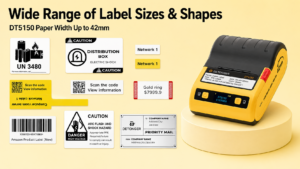
Detonger DT5150: The Portable IT Asset Specialist
For IT administrators, telecom installers, and field technicians tagging server racks, laptops, and networking switches, the Detonger DT5150 1.5-inch All-in-One Thermal Transfer Printer delivers compact precision.
- Why it excels for asset tagging:Featuring a 300 DPI printhead, the DT5150 outputs crisp micro-QR codes, DataMatrix codes, and sequential serial numbers on narrow tags down to 15mm. Its sealed, all-in-one consumable cassette integrates the pure resin ribbon and synthetic Silver PET or VOID label roll into a single cartridge. Technicians can swap media in seconds without threading ribbons or exposing delicate print elements to dust. With Bluetooth connectivity, staff can print durable tags on demand right at the server rack.
Detonger DT6250: Multi-Department Facility Workhorse
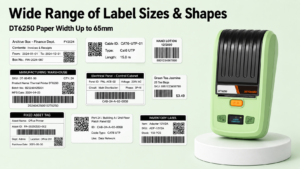
For facility managers, hospital asset directors, and warehouse supervisors managing larger equipment, audiovisual machinery, and facility tooling, the Detonger DT6250 provides expanded media flexibility.
- Why it excels for asset tagging:Supporting media widths up to 61mm (2.5 inches) at 300 DPI, the DT6250 provides ample printable area for prominent company ownership branding, asset department codes, property contact numbers, and dual-barcode configurations. Its split-type consumable design separates the ribbon supply from the label roll, lowering the ongoing cost-per-label during large-scale enterprise tagging overhauls.
Automating Asset Workflows with WePrint Software
A dedicated asset label printer requires intelligent software to eliminate manual data entry errors. Detonger hardware integrates natively with the WePrint application across iOS, Android, and Windows PC.
WePrint simplifies fixed asset tracking through targeted capabilities:
- Excel & ERP Database Synchronization:IT directors can export fixed asset registers from platforms like ServiceNow, SAP, or Jira into standard Excel (.xlsx) or CSV files. WePrint automatically maps database columns directly to custom tag templates, generating hundreds of unique, serialized tags in minutes without manual re-keying.
- Automated Alphanumeric Counters:For registering newly unboxed equipment on the fly, WePrint provides automated counters with customizable prefixes, suffixes, and zero-padding (e.g., CORP-IT-0001 through CORP-IT-9999).
- Encrypted Barcode & URL Embedding:The software encodes web URLs directly into 2D QR codes, enabling maintenance technicians to scan an equipment tag with a smartphone and immediately access service logs, warranty details, and user manuals.
Investing in a dedicated asset label printer prevents inventory discrepancies, simplifies tax depreciation audits, and secures physical equipment against tampering and theft. Explore Detonger’s specialized Barcode Label Printer for Warehouse, Inventory and Asset Tracking collection, or discover our high-durability Industrial Label Printer for Manufacturing, Warehouse and Durable Labels lineup to equip your business with professional-grade asset marking solutions today.
Frequently Asked Questions (FAQs)
Q: Can I use an asset label printer to create tamper-evident labels for expensive laptops?
A: Yes. Advanced thermal transfer printers like the Detonger DT5150 support tamper-evident “VOID” synthetic label stock. When printed with a pure resin ribbon, these tags remain sharp and scratch-resistant. If an unauthorized individual attempts to peel the tag off the laptop chassis, the adhesive separates, leaving a permanent sticky checkerboard or “VOID” pattern on the casing and destroying the label’s face.
Q: Why is 300 DPI considered mandatory for IT asset tracking labels?
A: Modern electronic devices offer minimal flat surface space, requiring labels as small as 15mm x 15mm or 20mm x 10mm. On tags this compact, 2D QR codes and DataMatrix symbols must use microscopic module cells. A 203 DPI printer creates larger dots that bleed together, rendering high-density codes unreadable by barcode imagers. A 300 DPI printhead preserves crisp geometry and stark contrast, ensuring quick, reliable scanning.
Q: How do mobile asset label printers connect to company inventory systems?
A: Mobile printers like the Detonger DT series connect to smartphones, tablets, or industrial handheld terminals via Bluetooth. Technicians use companion software (such as WePrint) to link with cloud databases or cached spreadsheets. For custom enterprise ERP workflows, Detonger provides multi-platform SDKs that allow corporate IT developers to trigger print jobs directly from internal asset management applications.