
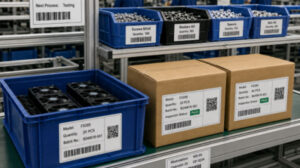
A qr barcode label printer is a high-precision thermal device utilized by warehouse supervisors, retail managers, and IT administrators to generate highly scannable 1D and 2D data matrices on demand. Because QR codes store vast amounts of data in a tiny square, the most critical selection factor is print resolution—specifically, choosing a 300 DPI printhead over a standard 203 DPI unit to ensure crisp edge definition. Buyers must also decide between direct thermal technology (for short-term logistics) and thermal transfer (for permanent asset tracking). You should initially judge your needs by measuring the physical surface area available for your label; if you must condense a URL, serial number, and product data into a 15mm square, a high-resolution mobile printer integrated with batch-printing software is absolutely mandatory to prevent scanning failures.
The Operational Advantage of 2D Barcode Integration
While traditional 1D linear barcodes (like UPC or EAN) are limited to strings of alphanumeric characters, 2D QR codes and DataMatrix codes can store thousands of characters, including URLs, complete maintenance histories, and encrypted batch data. As industries transition to smarter tracking systems, upgrading your hardware is essential.
Standard office laser printers or consumer-grade sticker machines cannot handle the rigorous demands of enterprise barcoding. When a QR code is printed with low contrast, smudged ink, or incorrect margins, optical scanners and smartphones will fail to read it. A dedicated qr barcode label printer solves this by utilizing precise thermal heat elements to create sharp, high-contrast, edge-to-edge black squares on specialized substrates, ensuring a 100% first-pass scan rate on the warehouse floor or retail checkout counter.
Key Selection Criteria for QR Code Printing Hardware
When procuring devices specifically for high-density barcode generation, B2B decision-makers must evaluate hardware based on precision and software connectivity.
- Print Resolution (The DPI Factor):This is the single most important specification. A QR code consists of tiny squares (modules). If the print resolution is too low, these modules bleed into one another, rendering the code unreadable. While 203 DPI (Dots Per Inch) is sufficient for simple 1D barcodes and large text, 300 DPI is required for printing dense QR codes on small surfaces like jewelry tags, electronic components, or laboratory vials.
- Print Technology & Substrate Match:If your QR codes are used for standard shipping or retail pricing, a direct thermal printer paired with top-coated paper is cost-effective. However, if the QR code is an asset tag for heavy machinery, you must use a thermal transfer printer that melts a resin ribbon onto synthetic PET labels to guarantee the barcode survives outdoor weathering and chemical cleaning.
- Form Factor and Mobility:In a sprawling warehouse or large retail floor, forcing employees to walk to a central computer to print a barcode destroys productivity. Portable, battery-operated printers equipped with Bluetooth allow workers to generate replacement QR codes directly at the pallet or shelf edge.
- Software and Database Integration:A barcode printer is useless if it cannot access your data. The hardware must support mobile applications or PC software that can pull data directly from Excel, ERP, or WMS databases to batch-print serialized QR codes instantly.
203 DPI vs. 300 DPI for QR Code Generation
To ensure your investment yields scannable results, compare how resolution impacts barcode printing:
| Metric / Capability | 203 DPI Thermal Printer | 300 DPI Thermal Printer |
| Dot Density | 8 dots per mm | 11.8 dots per mm |
| QR Code Clarity (Large Labels) | Good (Suitable for 4×6 shipping labels) | Excellent (Extremely crisp edges) |
| QR Code Clarity (Small Labels <20mm) | Poor (Modules may blur, high scan failure rate) | Perfect (Sharp definition, flawless scanning) |
| 1D Barcode Performance | Excellent for standard widths | Excellent, allows for higher density lines |
| Best Application | Standard logistics, large retail shelf tags | Asset tracking, jewelry, electronics, lab vials |
If your enterprise relies heavily on 2D barcodes, investing in a 300 DPI printhead is a necessary insurance policy against operational bottlenecks caused by scanning failures.
Expert Hardware Recommendations from Detonger
Selecting the appropriate unit requires matching the machine’s capabilities to your environmental conditions and label dimensions. Detonger, an established manufacturer with 16 years of independent R&D experience, global ISO/CE certifications, and 11 invention patents, offers specialized hardware for precision barcoding.
Detonger DP300P: The High-Resolution Mobile Workhorse
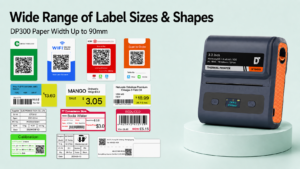
For retail environments, inventory management, and warehousing where mobility is key, the Detonger DP300P (the 300 DPI version of the DP300 series) is an exceptional choice.
- Why it fits QR printing:This 3.3-inch direct thermal printer supports label widths from 25mm to 90mm. Because it utilizes a 300 DPI printhead, floor managers can print highly complex QR codes on standard shelf-edge labels with absolute clarity. Equipped with dual 2600 mAh batteries, it is perfectly suited for long shifts, easily integrating into an Efficient Warehouse Label Printing
Detonger DT5250: For Permanent Asset QR Codes
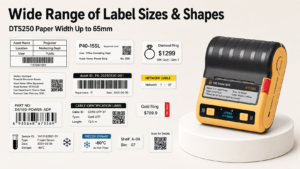
If your QR codes must survive industrial environments, the Detonger DT5250 2.5-inch All-in-One Thermal Transfer Printer is the optimal solution.
- Why it fits QR printing:Designed to print on durable synthetic materials like Silver PET and PVC, this unit melts a resin ribbon onto the label, ensuring the QR code remains scannable for over a decade. Available in a 300 DPI configuration, it handles intricate DataMatrix codes for fixed assets perfectly. Its one-piece consumable cassette makes reloading simple, bypassing the traditional complexities of thermal transfer machines.
Empowering Batch Production with Weprint Software
Hardware precision must be paired with intelligent data processing. Detonger printers integrate seamlessly with our proprietary Weprint software ecosystem, available on mobile and PC.
Weprint allows IT and warehouse managers to import massive datasets directly from Excel. You can map specific spreadsheet columns to generate unique QR codes automatically, enabling the batch printing of hundreds of serialized tags in minutes. For enterprise clients, we provide robust SDK and API access, allowing your developers to embed our printing protocols directly into your proprietary POS, WMS, or asset tracking systems.
Secure Your Tracking Infrastructure
Eliminating unreadable barcodes is the fastest way to accelerate inventory audits and streamline retail checkout. By prioritizing 300 DPI hardware, selecting the correct thermal technology for your environment, and utilizing smart software for bulk generation, your operations will run seamlessly.
To future-proof your data tracking capabilities, explore our complete Barcode Label Printer for Warehouse, Inventory and Asset Tracking solutions, or discover agile, on-the-go printing options in our Portable Label Printer and Handheld Label Maker for Small Business collection today.
Frequently Asked Questions (FAQs)
Q: Why does my smartphone fail to scan the QR code printed by my current label maker?
A: Scanning failures usually occur for three reasons: low print resolution (the printer is 203 DPI and the label is too small, causing the squares to blur), insufficient “quiet zone” (the white margin around the QR code is too narrow), or the use of worn-out direct thermal paper that lacks adequate black-and-white contrast.
Q: Can a single thermal printer generate both 1D linear barcodes and 2D QR codes?
A: Yes. The physical thermal printer simply outputs the graphic it receives from the software. Professional labeling apps like Weprint automatically encode your numerical or alphanumeric data into either a standard 1D barcode (like Code 128) or a 2D QR code, which the printer then outputs seamlessly.
Q: Do I need to buy ink to print black QR codes?
A: No. If you use a direct thermal qr barcode label printer, the heat from the printhead activates a chemical in the thermal paper to create the black image. If you use a thermal transfer printer, you will need to purchase a ribbon cartridge, but you will never deal with liquid ink or messy toner cartridges.