
A qr barcode label printer configured for batch data printing is an indispensable operational asset for automated warehouses, manufacturing assembly plants, logistics distribution hubs, and enterprise asset management teams. Unlike single-label printing workflows, batch data generation requires hardware and software capable of processing external datasets—such as thousands of unique records from an ERP export, CSV manifest, or relational database—and rendering unique 2D QR codes, 1D linear barcodes, and serialized alphanumeric fields consecutively at high speeds without buffer stalling or thermal throttling. The decisive technical selection criteria for high-volume batch barcode printing include a 300 DPI high-resolution printhead (to prevent dot-matrix bleeding as variable alphanumeric data expands within tight QR modules), dual-mode thermal transfer and direct thermal printing capabilities, and seamless spreadsheet-to-printer software integration. Operations managers should evaluate their throughput constraints: if your facility loses billable hours to manual template re-keying, label misalignments, or optical scanner read failures on production lines, deploying a dedicated batch-processing barcode printer is a mandatory operational upgrade.

The Operational Bottleneck of Manual and Fragmented Printing
In modern supply chain and manufacturing environments, batch printing is the backbone of traceability. Every pallet, carton, sub-assembly, and retail item requires a unique physical identifier matched to a digital record.
Relying on fragmented legacy methods—such as manual data entry via standalone numeric keypads, batch printing on standard office laser sheets, or using generic consumer label makers—creates severe vulnerabilities:
- Manual Entry Disasters:Having operators manually type serialized codes or product SKUs into a keypad introduces a high rate of human transcription error, leading to duplicate tracking numbers, mislabeled stock, and inventory ghost items.
- Buffer Delays and Stalling:Basic desktop label printers lack onboard processing power and memory. When receiving a batch print job of 500 or 1,000 distinct QR code graphics from a PC, basic units often pause between individual labels to render each new raster image, cutting daily throughput in half.
- Office Laser Sheet Fragility:Printing barcode sheets on standard office laser printers forces workers into rigid batch counts. If a single label is damaged during application, reprinting that individual tag disrupts the batch sequence, while paper labels quickly peel and tear under warehouse transit conditions.
Deploying an industrial-grade qr barcode label printer bypasses these bottlenecks entirely. Driven by intelligent batch processing algorithms and high-speed data interfaces, the printer ingests complete spreadsheets, dynamically parses variable data fields into standardized label templates, and outputs hundreds of consecutive, scannable tags in minutes.
Core Hardware Specifications for Batch Data Barcode Printing
Processing high-volume, variable batch data requires hardware engineered with specific mechanical, optical, and computing capabilities:
- 300 DPI High-Resolution Printhead:When printing variable datasets, string lengths often fluctuate (e.g., a batch where records scale from a 6-character lot ID to a 32-character encrypted URL). As data density grows, the QR code algorithm adds micro-modules, shrinking the physical size of individual black and white cells. A 203 DPI printhead will cause these shrinking modules to bleed into neighboring cells. A 300 DPI printhead maintains crisp, square geometry and razor-sharp quiet zones, ensuring 100% first-pass read rates under high-speed fixed-mount industrial scanners and mobile PDAs.
- Thermal Transfer vs. Direct Thermal Versatility:Your choice of thermal imaging must match the durability requirements of the batch. For short-cycle domestic courier waybills or daily retail cross-docking, inkless direct thermal printing on “three-proof” paper provides maximum cost efficiency. For fixed assets, automotive sub-assemblies, and chemical drum tracking lasting 5 to 10+ years, the hardware must support thermal transfer technology, using a pure resin ribbon to melt indelible graphics onto synthetic films (such as Matte Silver PET or flexible PVC).
- High-Speed Processing & Onboard Buffer Memory:Unlike static printing where the printer repeats a single cached graphic, batch data printing requires rendering a unique vector or raster image for every consecutive label. The printer must feature a fast internal 32-bit RISC processor and ample onboard SDRAM buffer memory to continuously stream and process dynamic 2D codes without mechanical hesitations.
- Optical Sensor Precision (Gap and Black Mark):In batch runs of 500 to 2,000 consecutive labels, mechanical paper drift can cause text and barcodes to shift across label margins. A commercial barcode printer must feature sensitive transmissive (gap) and reflective (black mark) sensors to recalibrate the top-of-form boundary for every single label, ensuring codes remain centered.
Comparing Thermal Technologies for Batch Barcode Production
| Evaluation Parameter | Direct Thermal Printing (3-Proof Media) | Thermal Transfer Printing (Resin Ribbon) |
| Imaging Mechanism | Heated printhead activates chemical paper coating | Heated printhead melts solid resin onto synthetic facestock |
| Consumable Requirement | Direct thermal label roll only (inkless) | Synthetic label roll (PET/PP) + solid resin ribbon |
| Batch Processing Cost | Lowest cost per label (single consumable) | Moderate (two separate consumables) |
| Variable QR Module Sharpness | Moderate (slight thermal bloom on dense micro-codes) | Superior (razor-sharp edges on microscopic modules) |
| Durability & Environmental Life | 6 to 12 months (indoor storage; heat/UV sensitive) | 5 to 15+ years (impervious to abrasion, water, oils, and solvents) |
| Primary Batch Application | Courier shipping manifests, daily retail price tags | Industrial asset registers, PCB tracking, chemical batch lots |
Top Detonger Models for Batch Data Barcode Printing
Detonger leverages 16 years of independent hardware research, global ISO9001 quality certifications, and 11 invention patents to deliver robust thermal hardware tailored for high-throughput batch printing.
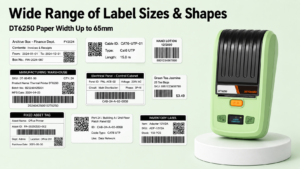
Detonger DT6250: Multi-Format Industrial Batch Workhorse
For manufacturing assembly lines, warehouse inventory bin marking, and enterprise asset management overhauls, the Detonger DT6250 2.5-inch Thermal Transfer Printer delivers commercial power and media flexibility.
- Why it excels for batch data:Supporting label widths up to 61mm (2.5 inches) at a sharp 300 DPI resolution, the DT6250 easily outputs multi-field batch formats—such as a dynamic QR code paired with a serialized linear 1D barcode, product description, and alphanumeric lot code. Its split-type consumable bay separates the ribbon supply from the label roll, allowing operations managers to load cost-effective bulk rolls of Matte Silver PET and durable resin ribbons, substantially reducing per-label costs during massive batch runs.
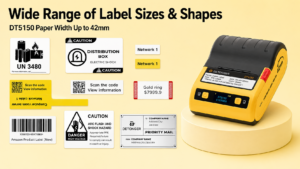
Detonger DT5150: The High-Precision Compact Batch Specialist
For electronics manufacturing, laboratory specimen accessioning, and IT asset tagging where small, high-density batch QR codes are required, the Detonger DT5150 1.5-inch All-in-One Thermal Transfer Printer provides benchtop precision.
- Why it excels for batch data:Outputting at 300 DPI, the DT5150 generates microscopic 2D DataMatrix and QR codes on narrow labels down to 15mm without module distortion. Its all-in-one consumable cassette integrates the resin ribbon and synthetic label roll into a single drop-in cartridge, allowing operators to reload media in seconds without interrupting continuous batch workflows. Built-in Bluetooth enables mobile teams to execute batch runs directly from a smartphone or tablet at the workstation.
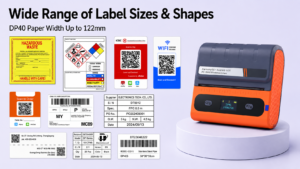
Detonger DP40 Series: High-Volume Mobile Logistics Champion
For 3PL distribution centers, freight forwarding hubs, and pallet staging lanes, the Detonger DP40 Series handles wide-format batch dispatch tasks on the move.
- Why it excels for batch data:Accommodating media widths up to 114mm (with a 104mm effective print width), the DP40 batch-prints standard 4×6 inch logistics waybills and pallet barcodes directly from warehouse management spreadsheets. Powered by dual 2600 mAh battery packs, workers can batch-print hundreds of serialized carrier waybills directly at the loading dock.
Automating Batch Workflows with WePrint Software
A high-performance qr barcode label printer requires intelligent software to eliminate manual data entry. Detonger hardware integrates natively with the WePrint application across iOS, Android, and Windows PC.
WePrint transforms complex external databases into dynamic physical labels through dedicated features:
- Direct Excel & CSV Spreadsheet Binding:Users can import external spreadsheets containing thousands of rows of SKUs, serial numbers, descriptions, and URLs. WePrint automatically maps database columns to the corresponding text, 1D barcode, and 2D QR code elements on the canvas.
- Dynamic 2D QR Code Generation:As the software steps through consecutive rows in the imported dataset, it dynamically regenerates the QR code vector for each record, eliminating the need to pre-generate and save thousands of static image files.
- Advanced Auto-Serialization:For batch runs generated on the fly without a pre-existing database, WePrint features customizable incrementing rules (such as step values, prefix/suffix additions, and leading zero padding), ensuring synchronized advancing across barcodes and human-readable text.
- Enterprise SDK & System Integration:For automated manufacturing execution systems (MES) and enterprise resource planning (ERP) platforms, Detonger provides multi-platform SDKs that enable IT teams to send batch print streams directly from existing central servers.
Equipping your production and logistics lines with a purpose-built qr barcode label printer eliminates data entry errors, streamlines inventory turnover, and ensures flawless optical traceability across your supply chain. Explore Detonger’s specialized Barcode Label Printer for Warehouse, Inventory and Asset Tracking collection, or discover our high-durability Industrial Label Printer for Manufacturing, Warehouse and Durable Labels lineup to upgrade your batch labeling infrastructure today.
Frequently Asked Questions (FAQs)
Q: Can a qr barcode label printer dynamically generate unique QR codes directly from an Excel spreadsheet?
A: Yes. When using Detonger printers with the WePrint application, you do not need to generate QR code images beforehand. You simply design your label template, bind the QR code object to the specific column in your uploaded Excel (.xlsx) or CSV spreadsheet (such as an asset ID or URL column), and the software dynamically computes and prints the unique, scannable QR code for every row in the file.
Q: Why do some printers pause or slow down during large batch barcode print jobs?
A: Pauses between labels occur when a printer has insufficient onboard memory (RAM) or a slow internal processor. Because batch printing requires rendering a brand-new raster image for every unique QR code rather than repeating a static graphic, a printer with low processing bandwidth must wait for data to transfer from the host device. Commercial printers with fast 32-bit RISC processors and ample buffer memory eliminate these rendering bottlenecks.
Q: What printhead resolution is required for batch printing dense QR codes on small asset tags?
A: A 300 DPI (Dots Per Inch) printhead is strongly recommended. When batch printing variable data, some records will have longer character strings than others, causing the QR code to dynamically generate higher module densities (more rows and columns). On a 203 DPI printer, these microscopic cells often bleed together, causing optical scanners to fail. A 300 DPI printhead maintains crisp cell geometry regardless of shifting data lengths.